Stale orphan review
Over time, a Google tenant can accumulate accounts and groups that exist in Google but not in Realsmart — for example, ones created directly in Google. The orphan review surfaces the stale ones for you to deal with. Nothing here happens automatically.
Looking for Google Classrooms with an unknown or deleted owner? Those are orphaned classrooms — classes whose owner's account was suspended or deleted, so Google won't let them be changed. They aren't part of this review. Fix them on Google Workspace → Classroom → Orphaned classrooms — see Orphaned classrooms and The owner has left.
What gets flagged
A background check runs every Monday morning and lists, for each school whose Google sync is live (schools with Google off, or in preview mode, aren't checked):
- Users — a Google account that isn't in Realsmart, isn't already suspended, and either has never signed in or hasn't for 12 months. Anything used more recently isn't flagged.
- Empty groups — a Google group that isn't backed by any Realsmart group and has no members.
The list therefore only changes weekly. Items you have already decided on are hidden, and each Google address appears once.
Reviewing them
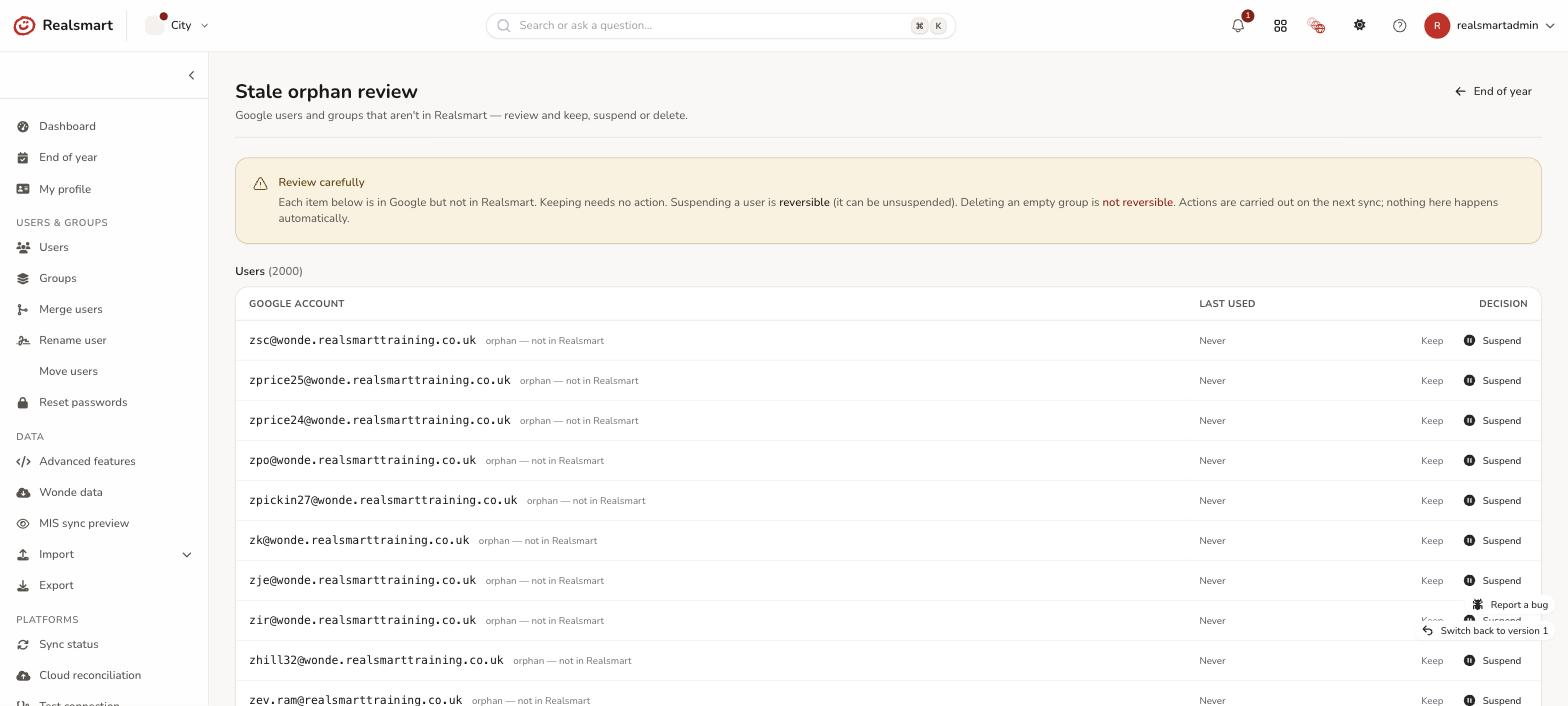
From the End of year page, choose Review orphans (in the Stale orphan review card). The page is titled Stale orphan review, with an End of year button to go back. It opens with a Review carefully note: "Each item below is in Google but not in Realsmart. Keeping needs no action. Suspending a user is reversible (it can be unsuspended). Deleting an empty group is not reversible."
The page has two lists:
- Users (N) — the columns are Google account, Last used (a date, or Never) and Decision.
- Keep — dismiss it; no change.
- Suspend — a reversible action; the account can be unsuspended later. You're asked to confirm ("Suspend … in Google? This is reversible — you can unsuspend it.") and the page says "… queued to suspend (reversible)."
- Empty groups (N) — the columns are Google group, Members (always Empty) and Decision.
- Keep — dismiss it; no change.
- Delete — this is not reversible, so you have to type to confirm ("Delete the empty group … from Google? This is NOT reversible."). The page says "… queued to delete."
You need the Manage users & groups permission to open the page and to Keep; Suspend and Delete also need Run syncs & provisioning. The page works on one school at a time, so in MAT mode it asks you to switch to a school ("Switch to a school to review its Google orphans.").
Your decision is recorded straight away and carried out by a daily job (about 11:00, Sunday to Friday), so a suspend or delete isn't instant. If Google refuses, the job tries again at the next run. It is never applied automatically without your confirmation. Keep is remembered: the same address won't be offered again.
If both lists say No user orphans to review and No empty group orphans, either nothing stale was found at the last Monday check, or your school's Google sync isn't live so it isn't checked.
When to run it
The natural time is at the end of the year, alongside the tidy-up and setting your window and resume date — running it before the freeze date means you're reviewing with full visibility, while accounts and groups are still live and easy to check. It's part of the recommended end-of-term sequence: see What happens at end of term for the full order. That said, orphans can build up at any time, so it's fine to review at any point in the year — it's per-school and admin-only, and nothing is removed automatically.
Was this guide helpful?
We read every response — it decides what we rewrite next.
Thanks for your feedback.