End of term Classroom options
You choose what happens to your Google Classrooms when the window closes. There are three options:
- Archive at end of term — Classrooms are archived once the window closes. The nightly Classroom sync (22:00, Sunday to Friday) and the archive sweep after it (22:45) do this from the evening of your final provision date.
- Leave active (never archive) — Classrooms are never archived by this process.
- Archive at the start of next term — archiving is deferred until your sync resumes for the new year and the window rolls forward.
This only applies if Google Classroom is switched on for your school.
School default vs per group
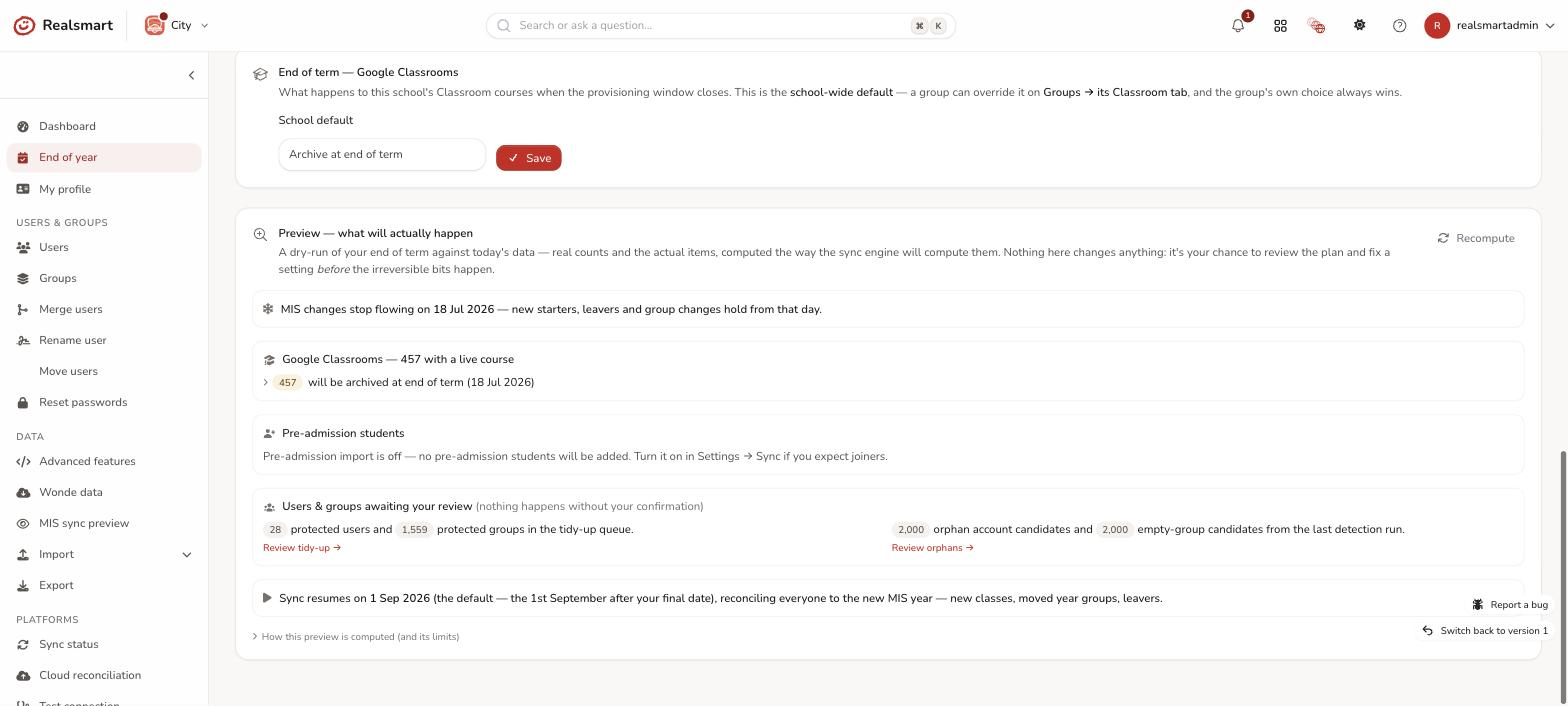
- Set a school-wide default on the End of year page, in the card End of term — Google Classrooms: choose a School default and select Save ("End of term Classroom option saved."). It applies to every group that hasn't chosen its own. It needs the Manage users & groups permission.
- Set a per-group option on each group's Classroom tab (Groups → open a group → Classroom), in the End of term section. The This group drop-down offers Inherit school default (…), Archive at end of term and Leave active (never archive); choose and select Save. A group can't pick Archive at the start of next term for itself; that is a school default only. If your school makes Microsoft class Teams, the tab is called Classroom and Teams and the group's choice covers its class Team too: see Microsoft Teams at year end.
Which one wins
The group's own choice always takes precedence over the school default — in both directions:
- If the school default is leave but a group is set to archive, that group is archived.
- If the school default is archive but a group is set to leave, that group stays active.
Each group's Classroom tab shows whether it is using the school default ("Using the school default.", naming what that default is) or overriding it ("Overriding the school default for this group."), so you can always see which is in effect.
What happens to classrooms you leave active
A classroom set to Leave active is not archived, and it stays live at Google over the summer with its members and work. But it is not carried into the new year. When your sync resumes, Realsmart disconnects every course still linked from last year from its group, and the group gets a fresh classroom for the new year. The old course keeps its members and work and teachers can still use it, but it is no longer kept in step with the group, so next year's pupils are never added to last year's course. Anything still due to be archived at that point is archived first. This is skipped for a school whose Google sync is off or in preview mode.
Because that surprises people, the End of year page tells you. While any classrooms are set to stay active, a card says "N Classrooms are set to stay active over the summer" and explains this. If you would rather those classrooms were archived like the rest:
- Select Archive all N at end of term instead and confirm ("Archive these Classrooms at end of term?"). It switches every group that is individually set to Leave active over to Archive at end of term. The courses are archived when the end-of-term sweep next runs. Teachers and pupils can still view an archived course but can no longer post in it. You can change any group back on its Classroom tab before then.
- Groups that are only staying active because the school default is Leave active aren't touched by that button; the card says how many there are. Change the school default above to archive them.
To bring last year's classrooms back or archive them in bulk later, see Reactivate last year's classrooms.
Notes
Changes to the school default and to a group's option are admin-only, logged, and applied by the provisioning service at end of term. The Preview — what will actually happen on the End of year page lists exactly which classrooms will be archived at end of term, archived at the new term, or stay active, with the reason for each (see What happens at end of term).
Was this guide helpful?
We read every response — it decides what we rewrite next.
Thanks for your feedback.