The provisioning window and the freeze
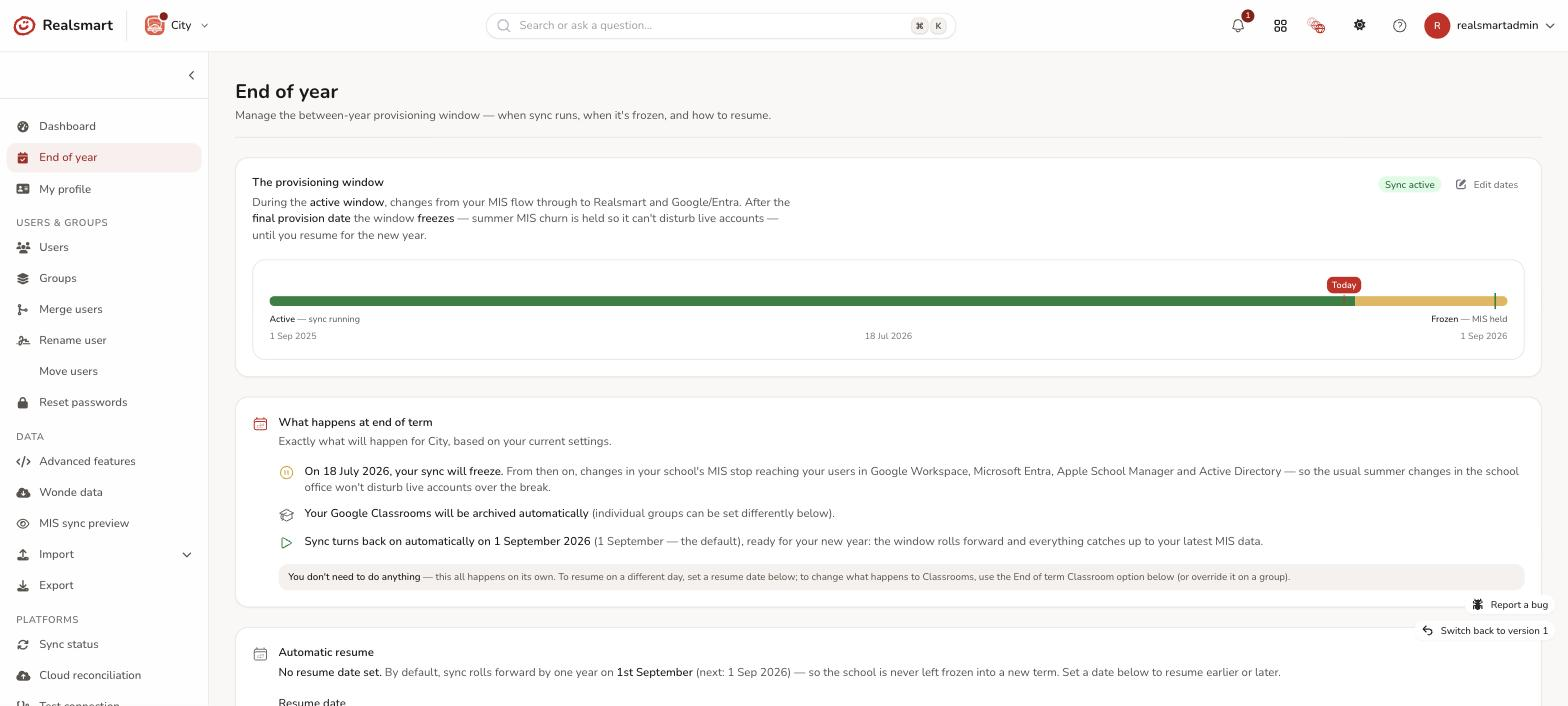
Your window is the period each year when sync is active. It has two dates, shown on the End of year page as a timeline:
- Window opens — the start of your academic year (typically 1 September). The page calls it the first provision date.
- Window closes — the end of term. The page calls it the final provision date. From this date, sync is frozen until the new year.
The badge at the top of the window card says Sync active or Sync frozen. While you are frozen the page also shows a Sync is frozen for the summer card, and, if you have a live Google or Entra sync, the Users and Groups pages show a Cloud sync is paused until … banner.
What "frozen" holds
A school is frozen from its final provision date (that day is the first frozen day) until its window rolls forward for the new year. While frozen:
- MIS changes are not pulled in and not written to Realsmart. Leavers, class changes and roll-overs happening in your school office over the summer are held, not applied.
- Nothing MIS-driven is pushed to Google or Entra. The whole-school Google and Microsoft Entra syncs are held for the frozen period, so live accounts aren't disturbed. The Active Directory feed is held too.
- Changes you make by hand are saved, then held for the cloud. The freeze is about MIS-driven change; it doesn't lock you out of the admin tools. A user or group you create or edit is saved in Realsmart straight away and reaches your cloud platforms when sync resumes. For one person who can't wait there is Send now; see Cloud sync is paused.
- Deleting is different. A user you delete while frozen is removed from Realsmart at the next weekday 20:00 clean-up, but their Google and Microsoft accounts aren't touched while you're frozen. Do deletions before the freeze where you can; see End-of-term tidy-up.
The freeze protects your live accounts during the noisiest time of the year, then lifts automatically when you resume.
One exception you can choose to use. "Nothing is pulled in while frozen" holds for everything the freeze exists to protect — but not for people who are only arriving. While frozen you can still create accounts for new members of staff (including September starters) and pupils who are joining, on demand, from the Release early accounts card. That card is on Data → Incoming learners and mentors; the End of year page has a card that points you there. It is preview-then-confirm, it never runs on its own, and it creates only those people: leavers, class changes, updates to existing accounts and mid-summer in-year admissions all still wait for resume. Released accounts get their role groups only — class, year and subject groups arrive at resume. See Release early accounts during the freeze.
Setting the window, and changing when it resumes
If your school has no window yet, the card shows Set up the window. Select it, enter Window opens (first provision date) and Window closes (final provision date), then select Save window. The closing date must be after the opening date. If saving would freeze or resume sync straight away, you get a box titled This changes the current sync state; the effect is immediate, so read it and choose Save and apply. You need Run syncs & provisioning to save a window.
Once a window exists, nobody edits its two dates by hand. The window rolls forward on its own each year, and the page has no date fields for it. What you control is when it resumes: use Automatic resume, or Resume for the new year to go early. See Resuming sync for the new year. As you change the resume date, the page updates live to show the effect, including plain-English "What happens at end of term" and "What happens at the start of next term" summaries built from your own dates. If a final provision date is wrong, contact Realsmart support.
Because these dates control whether MIS changes reach live accounts, changes are server-side and admin-only, and each one is logged.
The closing date also sets your academic year
The window's closing date does one more job: it's what tells sync which academic year your data belongs to. Usernames that include a year number — the "09" in jbrown09 — take that number from it.
The year your closing date falls in is your current academic year, and it moves on by a year when your window rolls forward at resume. So the year in new usernames changes over at the moment your new-year data actually starts arriving, rather than on a fixed calendar date:
- Resume in June or July (MIS rolled early) and September's intake is provisioned straight away as next year's students.
- Still frozen past 1 August and new accounts keep this year's number until you resume — correct, because while frozen nothing new has been pulled in and your year groups are still this year's.
- Inside a normal window, nothing looks any different.
The one thing that is pulled in while frozen is a release you ask for yourself: new staff and pupils who are joining, through Release early accounts (above). A pupil released that way is given the school year they are joining in, not the one that is ending — and like every username, theirs is permanent once created. See Release early accounts during the freeze.
Troubleshooting
- "The final date must be after the first date." — when setting up a window, the closing date has to come after the opening date.
- "Set a final provision date to define when the window closes." — enter the closing date as well as the opening date.
- "My school is still frozen in September" — the window should roll forward at 03:30 on your resume date (or 1 September). If it hasn't, the Logs show an error that reads "Sync still FROZEN past its resume trigger (…); resume overdue. Final provision date: …". Select Resume for the new year on the End of year page, or contact Realsmart support. See Resuming sync for the new year.
- "I can't find the fields to change my dates" — once a window exists they aren't editable; use Automatic resume to control when sync comes back.
- "A new starter isn't in Google and there's a Cloud sync is paused banner" — expected while frozen. See Cloud sync is paused, or release them early.
Was this guide helpful?
We read every response — it decides what we rewrite next.
Thanks for your feedback.