Onboard a school that already has a Google setup
A school joining from another provider usually already has Google users, groups and Classrooms — live, in daily use, under the previous provider's naming. If our sync ran naively it wouldn't recognise them and would create duplicates beside the real accounts. Cloud reconciliation prevents that: see how their setup lines up with Realsmart first, then converge deliberately.
The golden rule
Keep Google sync OFF or in Preview mode for the school while reconciling. The reconciliation page shows a red warning if the sync is live. Nothing on the reconciliation page changes anything — the audit only reads from Google, and the matching only compares.
Steps
Step 1: Run a cloud audit
In the sidebar, under Platforms, open Match cloud accounts (/v2/admin/sync/reconciliation) and select Run cloud audit (it says Re-run cloud audit once there's a result). It needs the Change sync, platform & API settings permission, and works one school at a time — in MAT overview it asks you to Choose a school to reconcile. The audit reads the school's existing Google users, groups and Classrooms (read-only) and takes a few minutes; the page shows Cloud audit queued… then Cloud audit running… and updates itself when it finishes.
Step 2: Read the picture
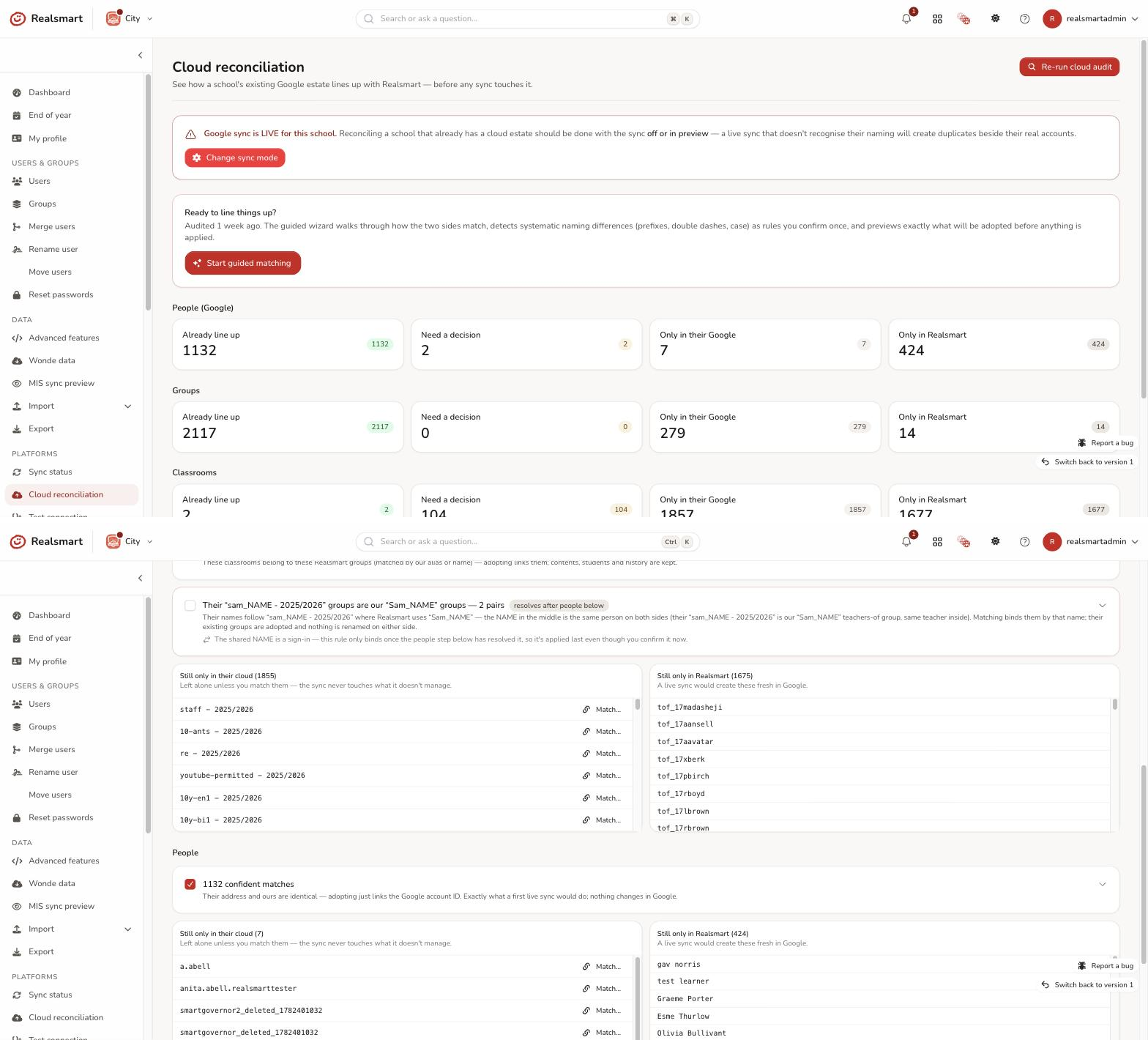
For each of People (Google), Groups and Classrooms — and People (Entra) if the school syncs to Microsoft Entra — you get four piles (select one to see who's in it):
- Already line up — their cloud address matches what Realsmart would use. The sync will simply adopt these; nothing to do.
- Need a decision — the same person or group exists on both sides under different names (matched by name). You'll choose a direction for these.
- Only in their Google — no Realsmart counterpart (service accounts, extras, or people the MIS import hasn't brought in yet).
- Only in Realsmart — no cloud counterpart; a live sync would create these.
Every item explains what it means in plain language.
Step 3: Start guided matching
Select Start guided matching (it appears once an audit has run). The wizard — titled Guided matching — walks through five steps with Back and Next, and nothing changes until you confirm at the end:
- In their cloud — what the audit found (people, groups, classrooms), read-only.
- In Realsmart — what the MIS import manages, and what a live sync would create.
- Line them up — the heart of it. Naming mismatches are usually systematic, not random: their groups might all carry a
house-prefix, or use double dashes (year--7vsyear-7), or differ only in capitalisation. The wizard detects these patterns and proposes each as a rule — confirm one rule and it resolves all of its pairs at once, instead of matching hundreds of items by hand. You can untick any single pair, resolve ambiguous items yourself (the wizard never guesses), and match leftovers manually with a search.
 4. People decisions — for people who exist on both sides under different sign-ins, pick a direction: adopt their sign-ins into Realsmart (Direction A — nothing changes in Google), or rename their cloud accounts to Realsmart naming (Direction B — a real change: you have to type RENAME to confirm, and it runs through the same safe machinery as renaming a user). Or leave it for later.
5. Preview & apply — the exact ledger of what will be adopted, linked and converged, and what a live sync would still (correctly) create. Select Apply these matches (or Apply — including cloud renames if you chose Direction B). Applying makes local associations only — their existing groups, classrooms and account IDs become the ones the sync manages — with every pair re-checked server-side at that moment. No duplicates by surprise.
4. People decisions — for people who exist on both sides under different sign-ins, pick a direction: adopt their sign-ins into Realsmart (Direction A — nothing changes in Google), or rename their cloud accounts to Realsmart naming (Direction B — a real change: you have to type RENAME to confirm, and it runs through the same safe machinery as renaming a user). Or leave it for later.
5. Preview & apply — the exact ledger of what will be adopted, linked and converged, and what a live sync would still (correctly) create. Select Apply these matches (or Apply — including cloud renames if you chose Direction B). Applying makes local associations only — their existing groups, classrooms and account IDs become the ones the sync manages — with every pair re-checked server-side at that moment. No duplicates by surprise.
Matching can only be applied while the sync is off or in preview — converge first, then go live. The page shows a green Safe to reconcile note in those states, and a red Google sync is LIVE for this school warning (with a Change sync mode button) when the sync is live; the Apply buttons are greyed out until you change it on School settings → Sync services. Entra estates are shown for visibility; converging usernames lines Entra up too, since sign-in names drive UPNs.
Step 4: Preview, then go live
Once converged, put the sync in Preview mode, run a preview, and check the plan is calm (no unexpected creates). Then flip to live.
Troubleshooting
-
"The page says the audit may be stuck" — it started a while ago but hasn't finished, so a sync worker may not be picking it up. Re-run it; if it stays stuck, contact Realsmart support.
-
"The last cloud audit failed" — nothing changed (the audit only reads). The error is shown on the page; usually this school's Google connection can't list its directory. Run Test permissions on Test connection, fix what it flags, then re-run.
-
"The audit ran but found no Google users or groups" — for a school with a live Google estate that almost always means the audit couldn't read the directory (a Google access or permission issue), not that Google is empty. Check the connection and re-run.
-
"Lots of people are in 'Only in their Google'" — usually the MIS import hasn't run for this school yet, so Realsmart is missing them. Import first, then re-run the audit.
-
"The same person shows in both 'Only in' piles" — their cloud name and MIS name differ too much to match automatically. Handle them with Merge users or the rename wizard.
Did this work for you?
If a step looked different on your site, tell us and we'll update the screenshots.
Thanks for your feedback.