Preview a sync before going live
Turning a sync on for the first time — pointing it at your live Google Workspace — is the scariest moment of setup. Preview mode removes the fear: the sync is on, it runs its real logic against your real data, but instead of making changes it records what it would do. You explore the plan, and when you're confident, flip to live — and the next run applies exactly what you previewed.
You need the Change sync, platform & API settings permission to change the mode, and View sync status to look at the plan. (Looking for the same idea for your MIS? See See what's coming from your MIS.)
The three states
A sync is always in exactly one state, shown plainly in Sync services:
- Disabled — the service doesn't run at all.
- On — preview only (no changes applied) — the sync runs and plans, but nothing is changed in Google. While previewing, only the user sync is planned; groups, Classroom and memberships are held entirely.
- Enabled — live — the sync applies its changes as normal.
Steps
Step 1: Turn Google sync on in preview
Open School settings in the sidebar and choose the Sync services tab. Switch Google Workspace on, then under Mode choose Preview — plan only. The badge changes to On — preview only (no changes applied) so the state is unmistakable. Select Save sync services to keep it.
Step 2: Run a preview
Open Sync preview — there's no sidebar item for it in a school; use the Explore the latest preview → link that appears under the mode setting while Preview — plan only is chosen (or go to /v2/admin/sync/preview) — and select Run preview now. The sync runs in the background — usually a few minutes — computing its plan the same way a live run would, including reading your real Google directory. The page refreshes itself every 30 seconds while the school is in preview.
Run preview now is the school's Google Workspace manual run, so it shares the 3-hour cool-down with Quick run and the Dashboard's Google button (see Trigger a manual sync), and it can't run while your sync is paused for the summer. The page says "Preview run queued" every time you press it, so check the generated … ago time above the plan to see whether a fresh plan has actually arrived.
Step 3: Explore the plan
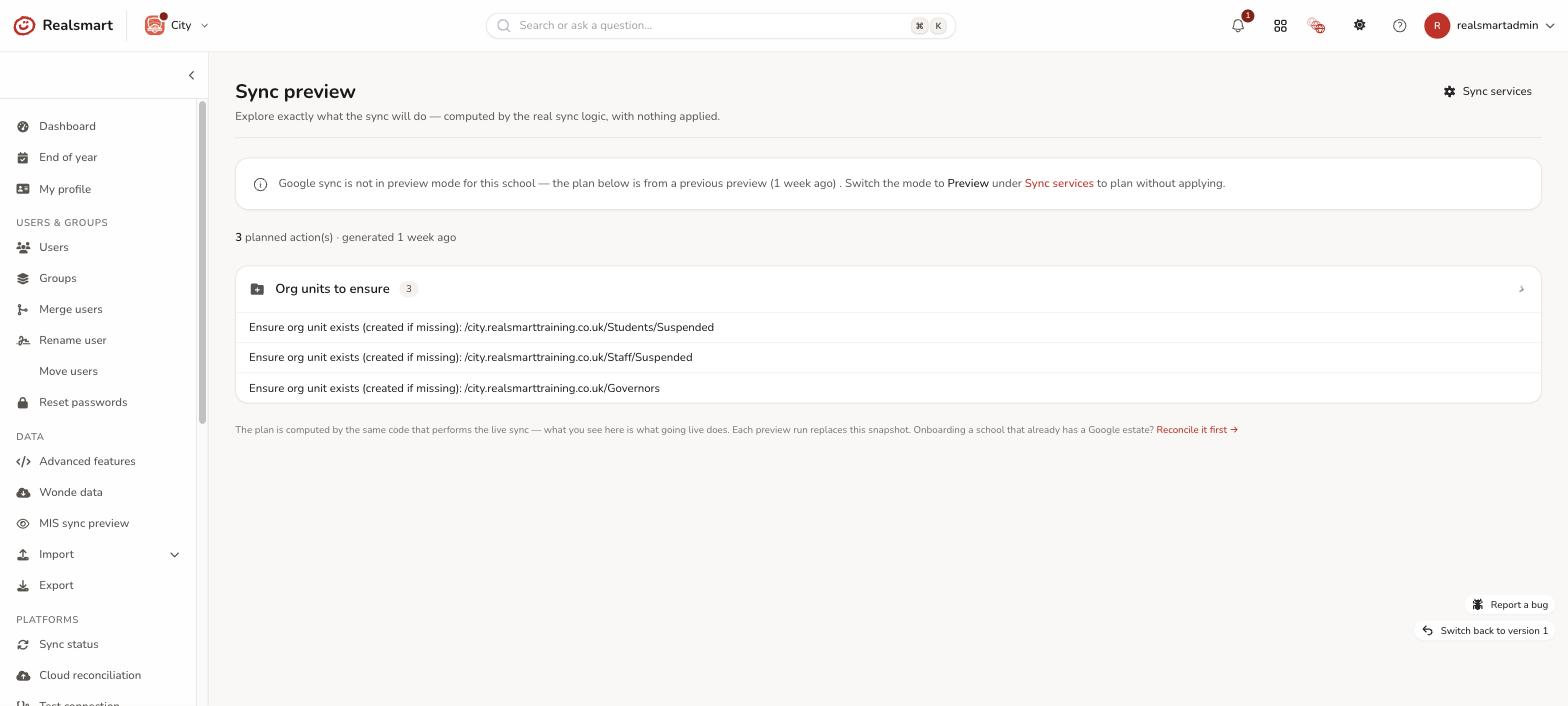
The page shows Google sync is ON — in preview only and the plan as drillable categories — Accounts to create, Accounts to update, Accounts to suspend, Org units to ensure, Classroom ownership moves and Other planned actions (only categories with something in them appear) — each with a count, expandable to the specific people and details ("Create Google account [email protected] in OU /Learners"). Every row links to the user (View user →) so you can check anything that looks surprising. A line above the list says how many actions are planned and when the plan was generated.
Step 4: Flip to live
Happy with the plan? Back on the Sync services tab, switch the mode to Live — apply changes and select Save sync services. The next sync run applies its changes for real. Because the preview was computed by the same code that performs the live sync, what you saw is what happens.
Seeing every school at once (MATs)
In MAT overview, open Sync preview (under Platforms) for Sync preview — trust view. Each school you administer is listed with its Google sync state (Off, Preview or Live) and the counts from its latest plan — Create, Update, Suspend, OUs and Classroom — biggest first, with trust-wide totals at the top. Select Explore to switch into a school and open its full plan. The counts can be a couple of minutes behind a fresh preview.
Honesty notes
- Preview mode never writes to Google — account changes, org units and Classroom transfers are all held and recorded instead.
- The plan reflects the moment it was generated; each preview run replaces the previous plan. If your MIS data changes, run a fresh preview.
- Preview currently covers the user sync (the create/update/suspend decisions). Groups, Classroom and membership syncs don't run at all while previewing — they'll be added to the plan in a later update.
- If you switch back to Live, the page keeps showing the last plan, marked as from a previous preview.
Troubleshooting
- "The plan is empty" — run a preview first (Step 2), and check the school actually has Google sync configured (domain set). If everyone is already in sync, an empty plan is the correct answer. With the school not in preview mode the page says No preview plan yet.
- "I flipped to live but nothing happened yet" — live changes apply on the next sync run (04:00, Sunday to Friday), or trigger one now with Quick run → Google Workspace or the Google button on the Dashboard.
- "Run preview now isn't there" — the button only shows while the school is in preview mode; check the Mode on School settings → Sync services.
Did this work for you?
If a step looked different on your site, tell us and we'll update the screenshots.
Thanks for your feedback.