Understanding MAT mode and school context
ADAdmin is built for trusts with more than one school. How you work depends on whether you are at the MAT level or inside one specific school. The school switcher at the top of every page, just to the right of the Realsmart logo, shows which one you are in.
Who can use MAT mode
MAT mode is for admins who can reach more than one school: admins whose account belongs to the trust itself. Admins whose account belongs to a single school never see it, and neither do mentors or learners.
Which schools you can reach also depends on your Admin permissions. A trust can limit an admin to some of its schools, and the limit applies everywhere: the switcher, every cross-school page and every search. See Admin permissions.
MAT mode vs per-school mode
MAT mode ("All schools")
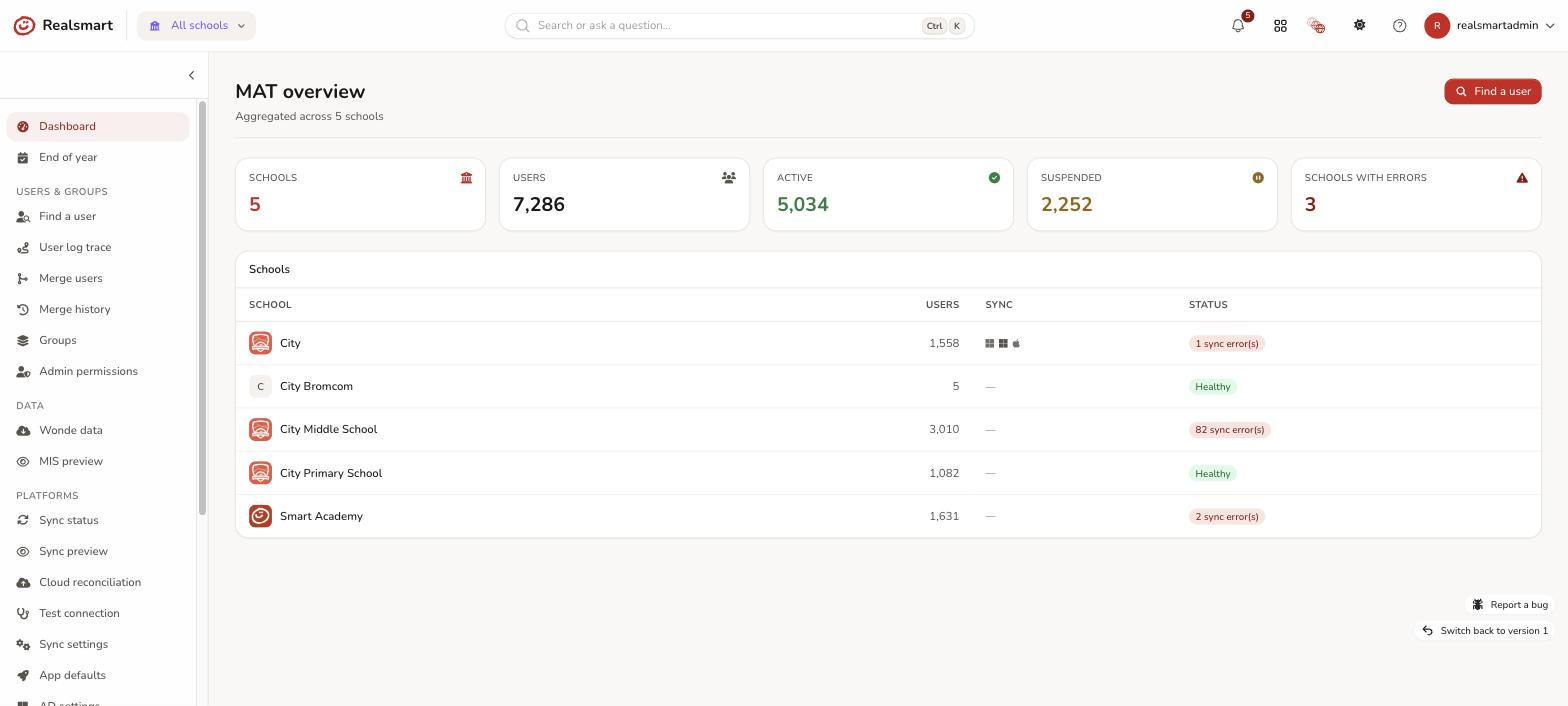
When the switcher shows All schools, you are in MAT mode. The sidebar then shows cross-school tools, grouped under Users & Groups, Admin, Data and Platforms, with Dashboard and End of year at the top. They include:
- Dashboard — the MAT overview
- Find a user — cross-school search
- User log trace, Merge users, Merge history and Creation history
- Groups — a cross-school groups list with the same bulk actions as the per-school Groups page (status, settings, add members, Classroom state, delete)
- Admin permissions — which admins can reach which schools
- Sync status, Sync preview, Match cloud accounts and the trust-wide settings pages
- MIS preview, Audit trail, Recent activity and more
Every tool, and what you need to see it, is listed in MAT overview dashboard.
So group management is available in MAT mode: you can review, filter and bulk-edit groups across every school you can reach without switching. Selecting a group's name from that list opens it in the classic admin (the older look) rather than the new group page.
What stays per-school only is anything scoped to a single record:
- Creating a user or a group.
- Editing one user's profile or one group's page in the new admin.
- Resetting a user's password and adding or removing group memberships.
If you reach one of those pages in MAT mode it refuses with a message such as "Switch to a school to create a group.", "Switch to a school to create a user." or "Switch to a school to edit a user." Choose the school in the switcher and try again.
Per-school mode — a specific school selected
When you pick a school in the switcher you enter per-school mode. In this view:
- You see that school's own sidebar, including Users, Groups, Apps and its settings.
- Creating a user or group, and editing an individual user's profile, all happen here.
- You work with that school's data only; other schools' users are not in view.
The school switcher
The school switcher is in the top bar, just to the right of the Realsmart logo. Select it to:
- Switch to a different school.
- Switch back to MAT overview — all schools.
See Switch school context for step-by-step instructions.
Why this matters
Many pages are context-sensitive: they show data or actions for your current context only.
| Job | Where to do it |
|---|---|
| Create a user or group | Per-school mode |
| Edit one user's profile | Per-school mode |
| Reset a user's password | Per-school mode |
| Add or remove group memberships | Per-school mode |
| Find a user across all schools | MAT mode (Find a user) |
| Bulk-edit groups across schools | MAT mode (Groups) |
| Merge duplicate accounts across schools | MAT mode (Merge users) |
| Merge duplicate accounts inside one school | Per-school mode (Users → Merge users) |
| See sync health for every school | MAT mode (Sync status) |
| Change each school's provisioning window or resume date | Per-school mode (End of year) |
Your access level
Whether a school appears in the switcher depends on your trust admin permissions. If a school you expect is missing, ask whoever manages your trust to check Admin permissions.
Related
Was this guide helpful?
We read every response — it decides what we rewrite next.
Thanks for your feedback.