Admin permissions — who can access which schools
Every admin in your trust can access every school by default. This page is where you see that at a glance across the whole trust, and reduce an individual admin to a subset of schools where you need to. It's in the MAT overview, under Users & Groups → Admin permissions. You only see it if your own access includes Manage other admins' access and you are in MAT mode.
The overview
The three cards at the top tell you the shape immediately — "N admins in this trust", "N full access (all M schools)" and "N reduced access". Reduced access is the exception worth noticing, so it's called out rather than buried.
The list shows every admin with their School access at a glance: Full access, or Reduced — N of M schools. The Access level column shows a separate chip — Full, Reduced, Reduced +N or Custom — for what they can do (see the last section). You can:
- Search by admin name or username (Search admins…).
- Filter by access level — Any access level, Full access or Reduced access.
- Filter by school — the Who can access… drop-down — "who can access St Augustine's?" — to see every admin permitted for one school.
Reduce an admin's access
Select Manage access on an admin. You'll see every school in the trust, each ticked by default (everyone starts with full access). Untick the schools this admin should not reach.
Because a trust can have dozens of schools, the editor is built for it:
- Select all / Clear all for the schools currently shown.
- A search box to find schools by name within the list.
- A live count ("38 of 44 schools") so you always know where you stand, with a Full access badge when every school is ticked.
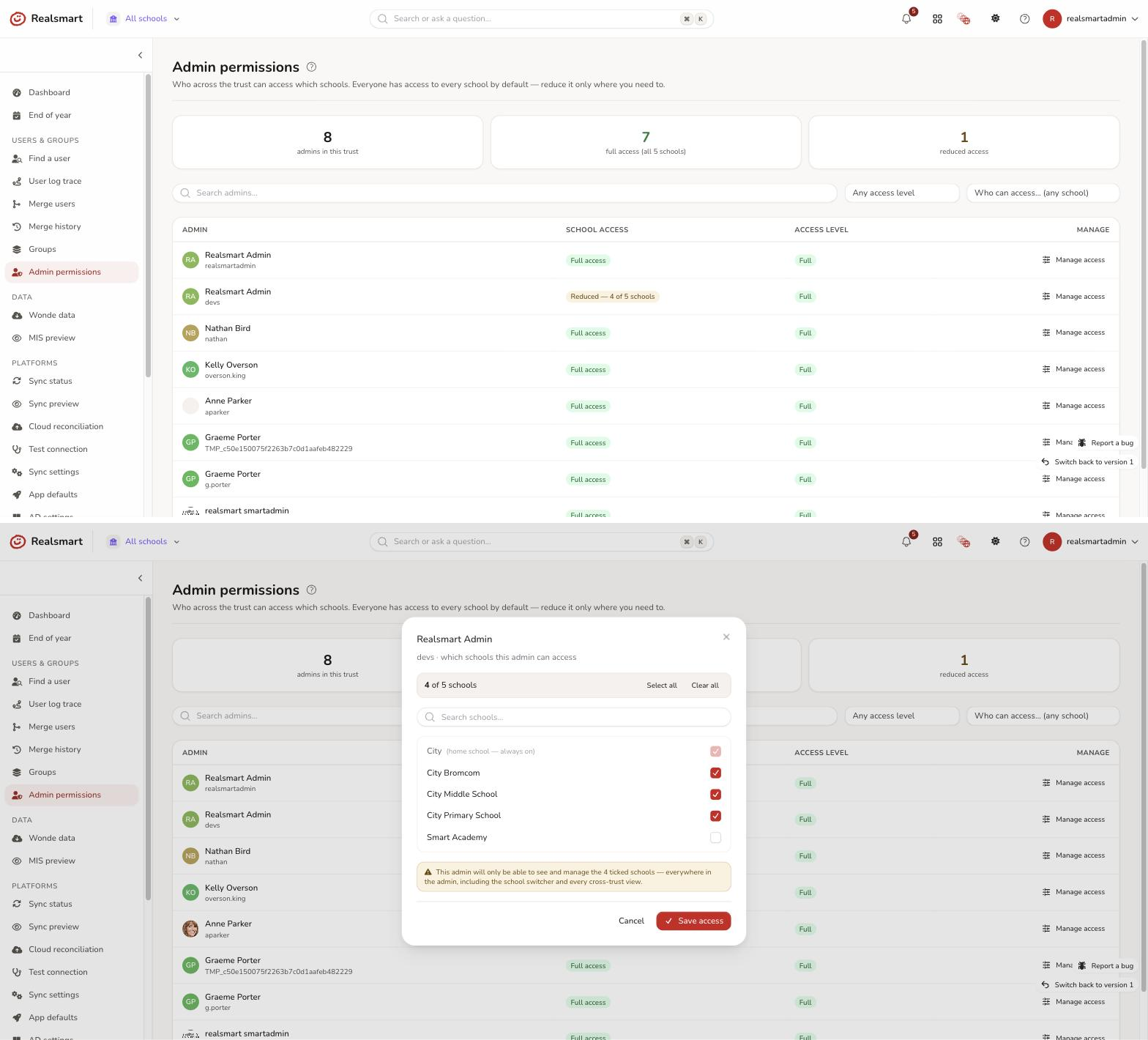
The admin's own home school is always kept — it's marked "(home school — always on)" and can't be removed here. While some schools are unticked, a note says "This admin will only be able to see and manage the N ticked schools — everywhere in the admin, including the school switcher and every cross-trust view." Select Save access to apply. A message confirms the result: "Saved — this admin now has access to X of Y schools.", "Saved — full access to all N schools restored." or "No changes — access left as it was."
This is a real boundary, not just a hidden menu
Reducing an admin genuinely restricts them, everywhere and on the server — not just in what they see:
- The school switcher only offers schools they're permitted; they can't switch to one they've been removed from.
- Every cross-trust view — the dashboard, user search, log trace, sync and MIS previews — only ever includes their permitted schools.
- No school-scoped query can return, or act on, a school outside their set. This matters for data protection: pupil information from other schools is never exposed to an admin who shouldn't see it.
- The classic (v1) admin follows the same rule: its school switcher and its school search never list a school the admin has been removed from, and an admin already working in that school is moved back to their own school on their next page. Following an old link to that school shows a You don't have access to this school page instead. They stay signed in and in the school they were working in, so Back to dashboard carries on from there.
To give someone full access back, open their editor and Select all, then save.
Who can change this, and what's recorded
Only a MAT admin whose access includes Manage other admins' access can manage permissions, and only for admins within their own trust and for schools they can themselves reach — nobody can grant access beyond their own. Every change is logged and recorded in the audit trail (who changed whose access, to which schools).
The classic (v1) admin manages the same permissions from a user's own page, so both stay in step during the rollover.
Two axes: which schools, and what they can do
This page governs which schools an admin can reach. A separate control governs what they can do within a school — full access, or a reduced day-to-day set. Each admin row shows an access-level chip (Full / Reduced / Custom) for that second axis; to change it, open the admin's Access tab. See Reduced admin access. The two compose: an admin's real power is the schools they can reach and the capabilities they hold — both enforced server-side.
Was this guide helpful?
We read every response — it decides what we rewrite next.
Thanks for your feedback.