Require MFA for staff and students
You can require multi-factor authentication (MFA) at sign-in with two independent, school-wide settings — one for staff, one for students. They work the same way and share the exact same mechanism; the only difference is who they apply to.
Admins and owners are different: they always use 2FA, whatever these settings say. See Admins always use 2FA below.
Turning it on
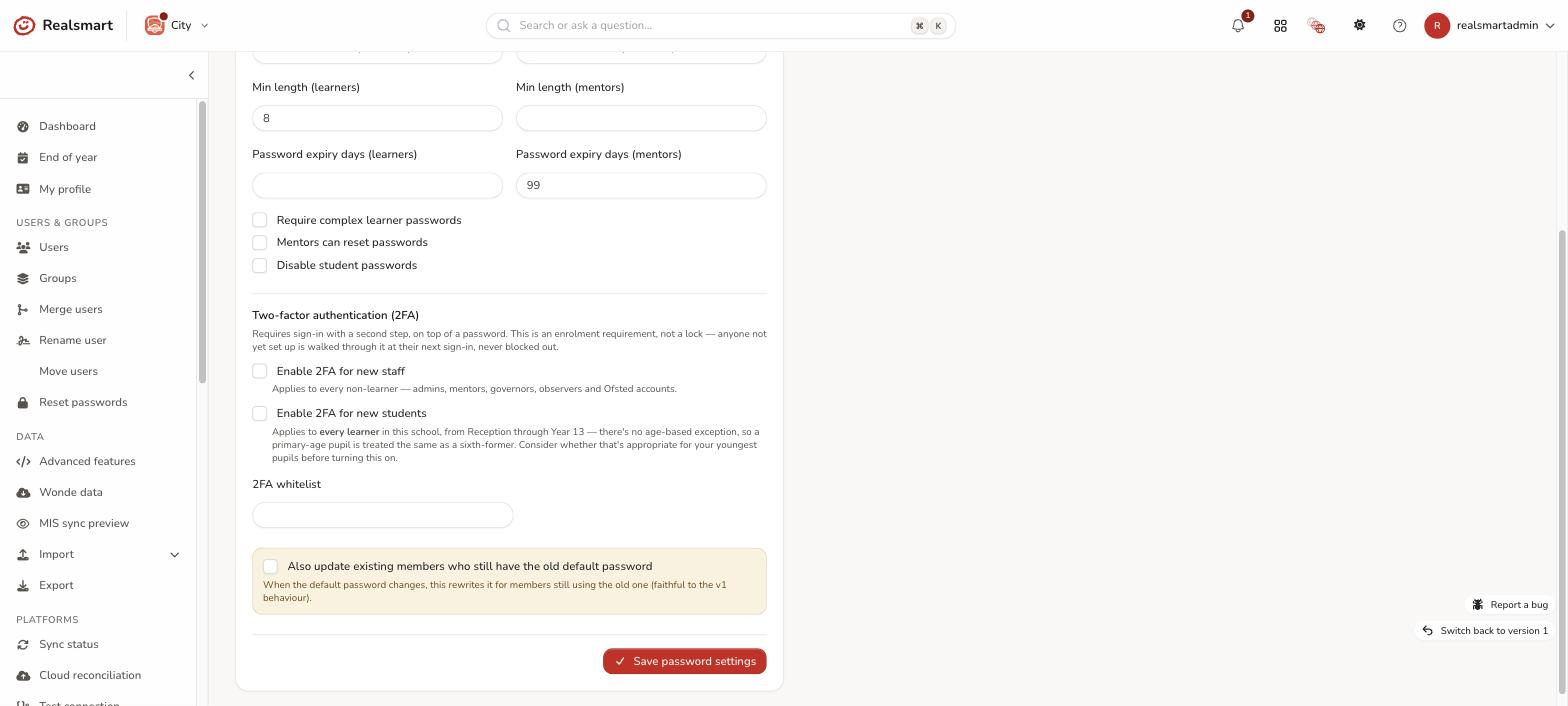
In School settings → Password, under Two-factor authentication (2FA):
- Enable 2FA for all staff (admins always require it) — applies to every non-learner (mentor, governor, observer, Ofsted). Admins need 2FA whether or not this is on.
- Enable 2FA for all students — applies to every learner in the school, from Reception through Year 13. There's no age-based exception, so think about whether that's right for your youngest pupils before turning it on.
Turn on either, both, or neither — they don't depend on each other.
These two used to be labelled "Enable 2FA for new staff/students". They're the same settings — renamed because they have always applied to existing members as well as new ones, as the next section explains.
When a setting is on:
- Every member in that group is set to require MFA.
- Existing members are updated straight away — not just new ones.
- Anyone added later is covered automatically while the setting stays on.
- Members outside that group are never affected — turning on the staff setting never touches learners, and vice versa.
Time to set it up
Days to set up 2FA after it's required, on the same Password tab, gives people time before they have to set 2FA up. It counts from when 2FA first became required for each person. Choose from 0 to 30 days.
- 0 (the default) means people are asked to set it up the next time they sign in.
- Any other number lets them keep signing in as normal for that many days. After that, they're asked to set it up at their next sign-in.
This covers the two settings above, and anyone whose own Require 2FA switch you turn on. Admins have their own 14 days (described below) unless your Enable 2FA for all staff setting is on, in which case your school's days apply to them too.
Admins always use 2FA
Admins and owners always use 2FA, at every school. There's no setting to turn it off, and Realsmart's support accounts use it too.
- Time to set it up: each admin has 14 days to set it up, counted from their next sign-in. After that, they're asked to set it up when they next sign in. Whatever date that works out as, no admin's deadline falls before 21 November 2026. That is a one-off floor, and it stops mattering once the date has passed.
- No exemptions: admins can't be exempted. The Exempt from MFA button doesn't appear on an admin's profile, the Users list skips admins when you exempt a selection, and the assistant won't do it either. An exemption saved on an admin before this rule is still shown, but it has no effect.
- No IP whitelist: the school's Trusted IP addresses don't let an admin skip 2FA.
- Their own switch is locked: on an admin's Security tab, Require 2FA shows as on and can't be turned off.
Admins not yet using 2FA, on School settings → Password, lists the admins and owners who haven't set up an authenticator app or a passkey yet, and where each one stands:
- 14 days to set it up from their next sign-in — they haven't signed in since the rule began.
- Until a date — they're in their 14 days, which end then (shown in your school's time zone).
- Grace ended: asked to set it up at their next sign-in — their 14 days are over.
To see everyone who has to use 2FA, not just admins, with their deadlines, go to School settings → 2FA set-up.
One user at a time
You don't need a school-wide setting to use 2FA. On any user's edit page, the Security tab has a Require 2FA switch for that person alone, a badge showing whether they've set up an authenticator yet, and a Reset authenticator button for when they've lost their phone.
The school-wide setting outranks the per-user switch: while a setting above is on, the switch is locked on for everyone it covers and can't be turned off per user. For the one person who genuinely can't use MFA, use the exemption described below instead of turning the school setting off — turning it off doesn't turn 2FA off for anyone; it only stops requiring it for people added later. The Disable 2FA bulk action on the Users list doesn't get round it either: while a school setting covers someone, they're still asked at sign-in.
What it doesn't change
This controls the MFA requirement on each account. The actual MFA prompt and enrolment happen at sign-in — a member who hasn't set up MFA yet is walked through it when they next sign in, rather than being locked out. This matters most for students: a child who was locked out couldn't recover their own access the way a member of staff usually can, so neither setting ever works that way.
To see what people are asked to do at sign-in, or to send them the steps, see Set up two-factor authentication when you sign in.
Trusted IP addresses (on the same Password tab, under the two toggles) is a separate, network-level exception: sign-ins from those addresses skip the 2FA step, except for admins, who are always asked. Enter addresses separated by commas. It applies to both settings alike and is unrelated to the per-person exemptions below.
Both settings are per-school and admin-only, and every change is logged in the audit trail.
Exempt one person
Sometimes one person genuinely can't use MFA even though their group requires it — no personal device, a disability an authenticator app doesn't accommodate, or a shared/break-glass account. Rather than turning the school-wide setting off for everyone, admins can exempt just that one member. Admins themselves can't be exempted (see Admins always use 2FA).
One user, from their profile: open the user's edit page, go to the Security tab, and in the Two-factor authentication card use Exempt from MFA (it appears only while the school requires MFA for their role). The badge shows Exempt, the switch stays locked, and the button reads Remove MFA exemption once they're exempt, so you can reverse it the same way.
Several at once: select the users in the Users list, open Password actions, and choose Exempt from MFA or Remove MFA exemption.
The whole list, from School settings: the Exempt users list under the 2FA toggles on School settings → Password shows everyone currently exempt in this school, as a row of pills. Type a name, username or MIS id into the search box and pick someone to add them; select the × on a pill to remove that person's exemption. Each add or remove applies straight away — it doesn't wait for Save password settings. This is the same exemption as the two routes above (one list, three places to manage it), so a person exempted from their profile appears here, and someone removed here shows as no longer exempt on their profile.
What exemption does:
- The member's MFA requirement is switched off immediately — they won't be asked for MFA at sign-in even though the school-wide setting for their group (staff or students) is on.
- It's per-user and reversible: removing the exemption re-applies the school's requirement for that person straight away, the same way turning the school-wide setting on does for everyone else.
- The overnight sync respects it — an exempt member is never swept back into "must use MFA" by the nightly reconciliation, only by an admin explicitly removing the exemption.
- Exemption is admin-only, and both setting and removing it are logged in the audit trail.
Set it for a whole trust
If your schools are in a trust, a trust admin can set 2FA once for all of them. Only a trust admin can use this page; anyone else sees "Only a trust admin can manage the trust's 2FA defaults." In the MAT overview, open 2FA defaults, choose Enable 2FA for all staff, Enable 2FA for all students and Days to set up 2FA after it's required, then select Save and apply.
- The trust's choice is written onto each school's own Password settings, and recorded in each school's audit trail, as if it had been changed there.
- The list of schools shows whether each one is following the trust's default or differs because it was changed locally since.
- Next time, you can apply a new default to every school, or only to the schools still following the current one, so a school that chose its own setting keeps it.
- On a school's own Password tab, a line says whether it is following the trust's default, or what the trust's default is if the school differs. A school can still change its own setting.
Related
Was this guide helpful?
We read every response — it decides what we rewrite next.
Thanks for your feedback.