All guides / School-management
Smart Arbor Statistics
Overview
Smart Arbor Statistics connects your website to one or more of Arbor's data export feeds and lets you display any figure from them on a page using a shortcode — pupil numbers, attendance percentages, staff counts, or anything else your Arbor export includes.
Its page is under Smart Plugins → Smart Arbor Statistics in the WordPress admin menu, with two parts: Endpoints, where you add the Arbor data export(s) to pull from, and Values & Shortcodes, where you find the shortcode for each figure once it has been fetched. Only administrators can see this menu.
Getting set up
Step 1: Add an Arbor endpoint
Go to Smart Plugins → Smart Arbor Statistics (this opens on the Endpoints page). Select + Add New and fill in:
- Label — a name to help you recognise this export later.
- Arbor Export URL — the full data-export URL from Arbor, including its hash segment.
- Basic Auth Token — only if your Arbor export requires it; otherwise leave it blank.
- Active — ticked by default, so this endpoint is included when everything refreshes automatically.
Select Save Endpoint.
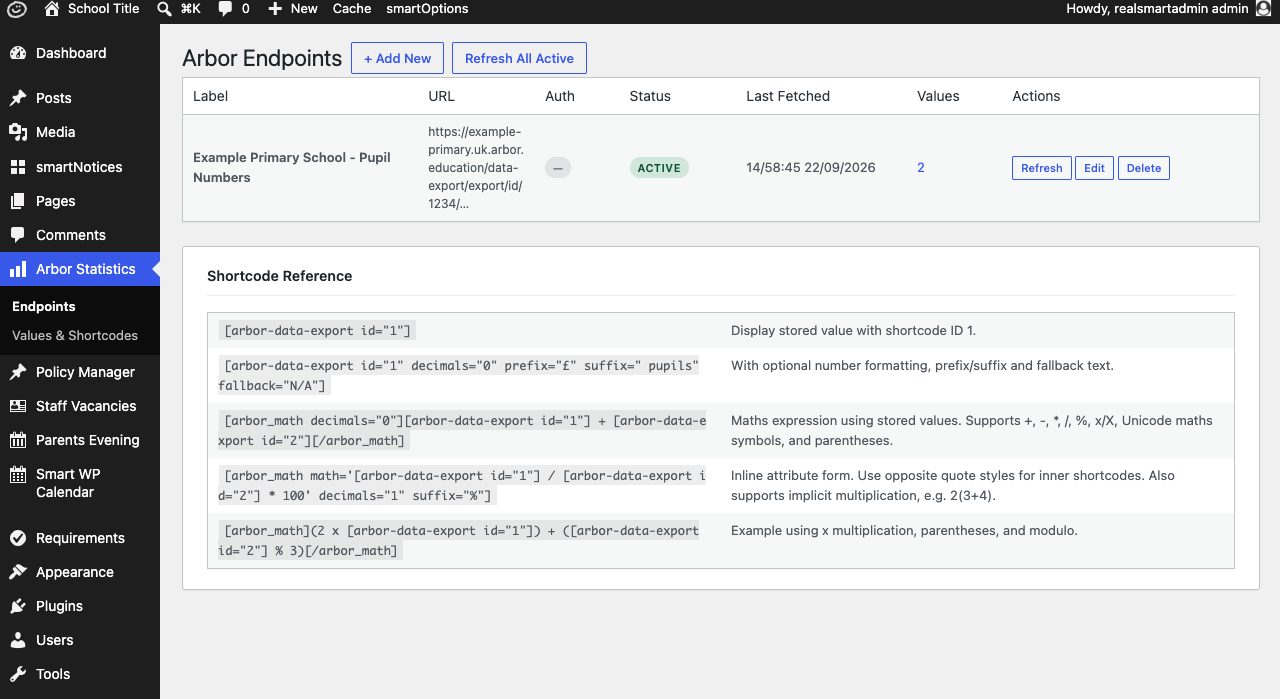
Step 2: Fetch the data
Select Refresh on the endpoint's row to pull its data in for the first time. Once fetched, the row shows when it was Last Fetched and how many Values were stored. After that, every active endpoint refreshes itself automatically about once a day. Use Refresh on a row any time you need that endpoint's figures sooner. Refresh All Active only fetches active endpoints that have not been fetched in the last 23 hours, so it skips an endpoint you refreshed recently.
Step 3: Find the shortcode for a figure
Go to Values & Shortcodes. Every individual figure Arbor returned is listed here as its own row, each with its own numeric ID. Select the shortcode shown for the one you want — it copies to your clipboard.
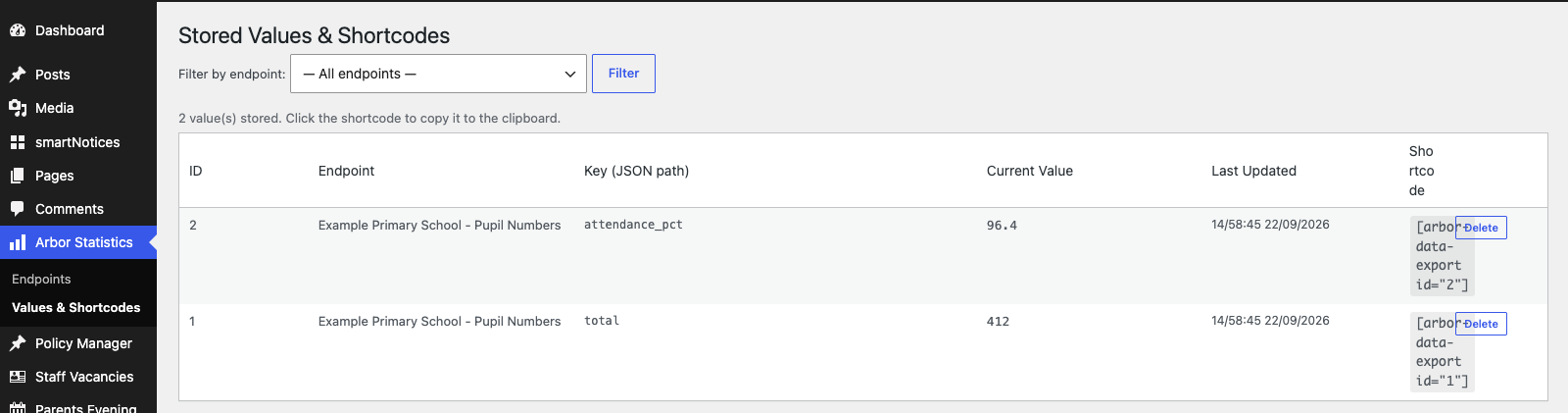
Step 4: Add the shortcode to a page
Paste the shortcode into any page or post, for example [arbor-data-export id="1" decimals="0"]. Publish the page and check the figure appears as expected.
Features
Endpoints
Where to find it: Arbor Statistics → Endpoints
Settings:
| Setting | What it does | Default |
|---|---|---|
| Label | Friendly name shown on the Endpoints page | — |
| Arbor Export URL | The full data-export URL from Arbor | — |
| Basic Auth Token | Optional authentication token for the export. When you edit an endpoint, leaving this blank keeps the token already saved | Empty |
| Active | Whether this endpoint is included in the automatic daily refresh | On |
Display shortcode
| Shortcode | Parameters | Example |
|---|---|---|
[arbor-data-export] |
id (required), decimals, prefix, suffix, fallback |
[arbor-data-export id="1" decimals="0" suffix=" pupils" fallback="N/A"] |
decimals rounds the figure to that many decimal places; leave it out to show the value exactly as Arbor sent it. prefix and suffix add text before and after the figure (for example a currency symbol or a unit). fallback is shown instead if the figure hasn't been fetched yet, or fetching failed.
Combining figures with maths
[arbor_math] evaluates a maths expression built from one or more [arbor-data-export] shortcodes — useful for a percentage or a total from several endpoints.
[arbor_math decimals="1" suffix="%"]
([arbor-data-export id="1"] / [arbor-data-export id="2"]) * 100
[/arbor_math]
It supports +, -, *, /, % (modulo), parentheses, and x as an alternative to *. You can also write the expression inline as a math attribute — use the opposite quote style to the inner shortcodes so they don't clash:
[arbor_math math='[arbor-data-export id="1"] / [arbor-data-export id="2"] * 100' decimals="1" suffix="%"]
| Shortcode | Parameters | Example |
|---|---|---|
[arbor_math] |
math (or enclosing content), decimals (default 2), prefix, suffix |
See above |
Troubleshooting
A shortcode shows nothing, or the fallback text
Why it happens: There is no stored value for that ID — the endpoint it comes from has never been fetched successfully, the value was deleted, or the ID in the shortcode is wrong. (If a later refresh fails, the last value that was fetched successfully keeps showing.)
How to fix it:
- Go to Values & Shortcodes and check the ID in your shortcode is listed there with a Current Value.
- If it isn't, go to Endpoints and look at Last Fetched (it says Never if the endpoint has never been fetched), then select Refresh on that endpoint.
- If the refresh fails, an error message appears at the top of the page. Check that the Arbor Export URL is correct and still valid, and that the Basic Auth Token matches what Arbor requires (leave it blank if Arbor doesn't ask for one).
[arbor_math] shows the wrong number, or 0
Why it happens: One of the nested [arbor-data-export] shortcodes inside it hasn't fetched a value yet (an empty figure is treated as 0 in the maths), or the inner shortcodes use the same quote style as the outer [arbor_math ...] shortcode when written inline with the math attribute, which breaks the attribute.
How to fix it:
- Check every
[arbor-data-export id="…"]used inside the expression has a value on Values & Shortcodes. - If you're using the inline
math="…"form, make sure the inner shortcodes use single quotes if the outer one uses double quotes, or vice versa — or use the enclosing[arbor_math]…[/arbor_math]form instead, which avoids the issue.
Did this work for you?
If a step looked different on your site, tell us and we'll update the screenshots.
Thanks for your feedback.