Using filters
The Users and Groups pages have a filter panel for narrowing the list to exactly what you need.
Opening filters
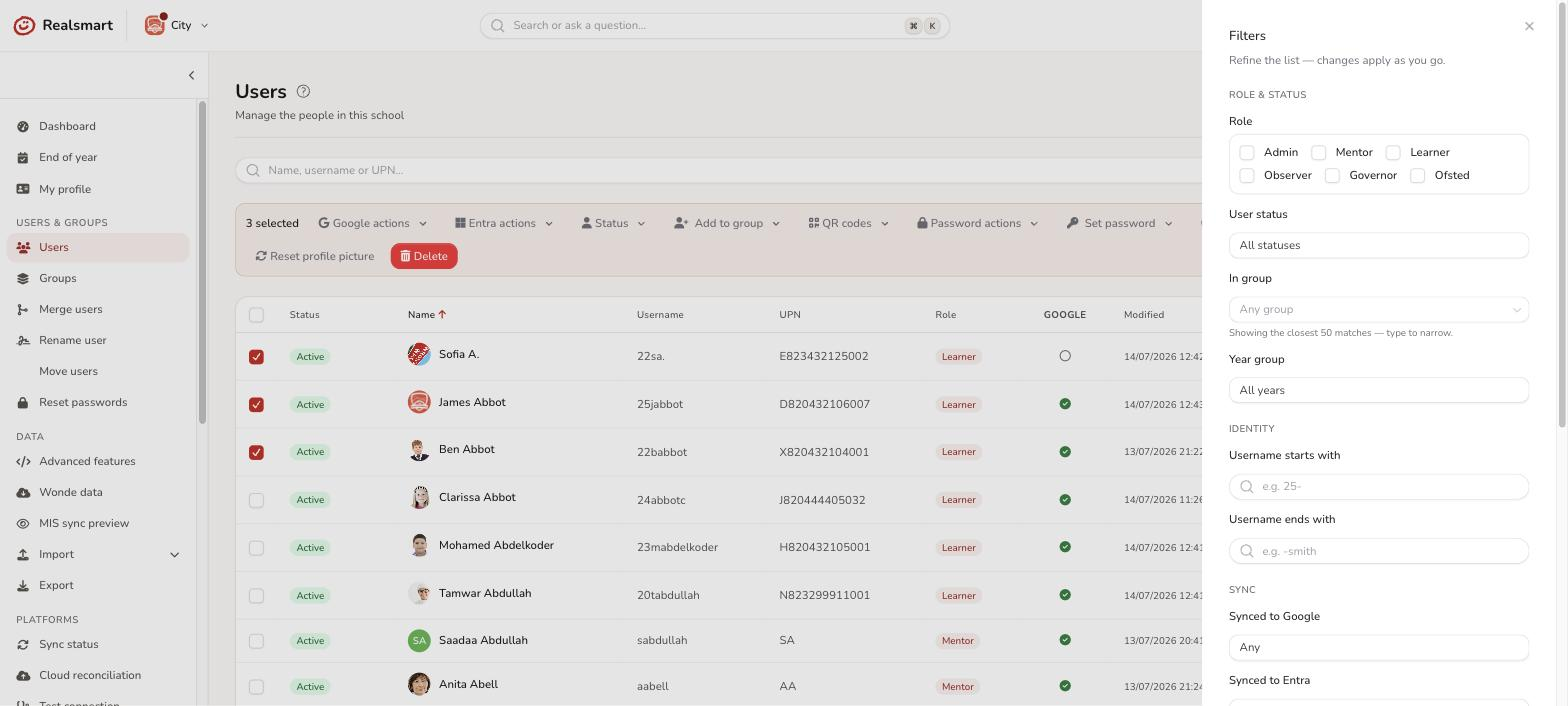
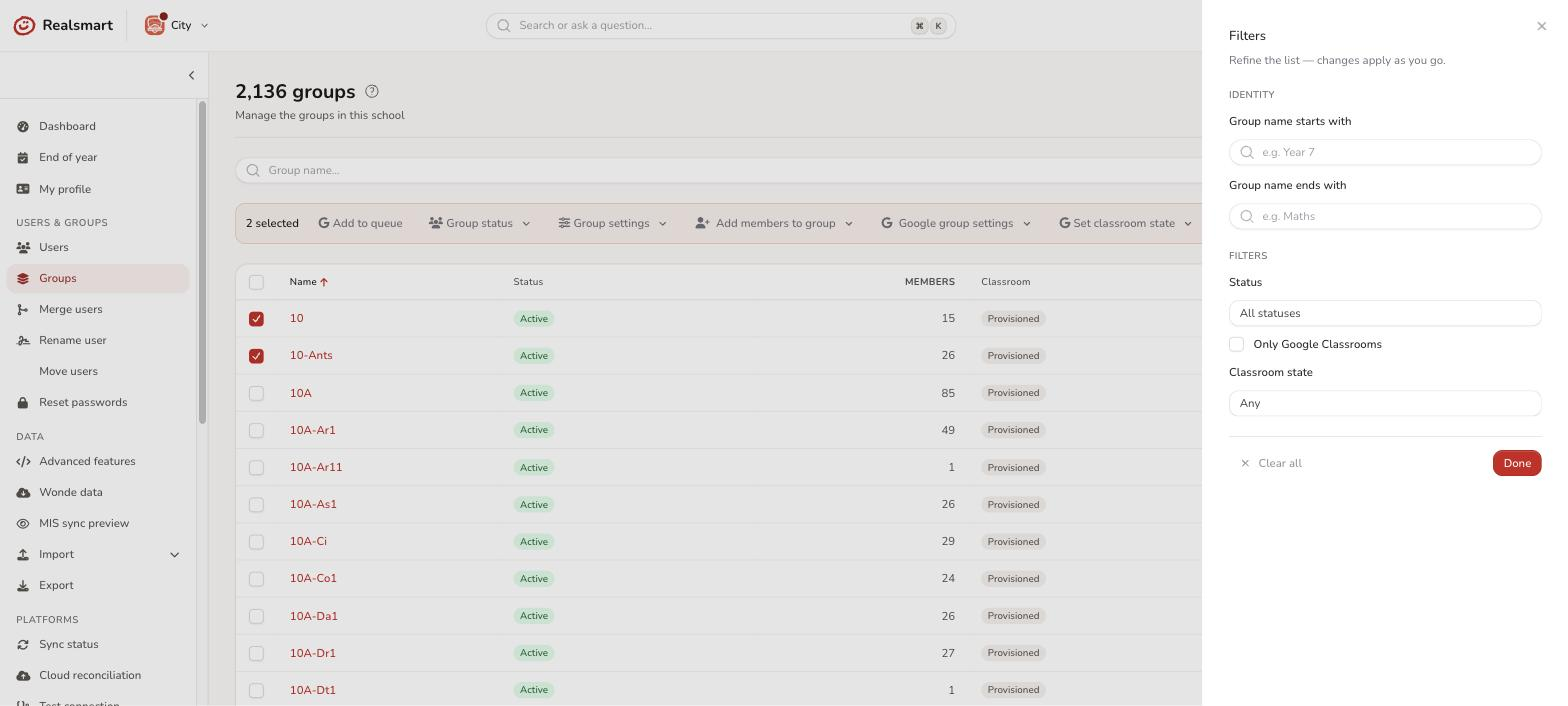
Select Filters near the top of the Users or Groups page (or press F when you're not typing in a box) to open the filter panel — a drawer on the right headed Filters, with the note Refine the list — changes apply as you go. The search box stays on the bar itself; the other filters are in the drawer, grouped under small headings. The button shows how many filters are applied. Choose Done to close the drawer.
Applied filters are also shown as chips below the bar — select the × on a chip to remove just that filter, or Clear all (beside the chips, or at the bottom of the drawer) to reset everything. On the Users page the number of matching users updates on the bar as you go.
User filters
The panel groups filters into sections; the section is shown here so you know where to look.
| Filter | Section | What it does |
|---|---|---|
| Search all fields | (main bar) | Free-text search across name, username, and UPN / staff code. Pasting a full email address works — it also tries the part before the @ as a username |
| Role | Role & status | Show only Admin, Mentor, Learner, Observer, Governor, or Ofsted accounts (multi-select) |
| User status | Role & status | Active · Pending suspension · Suspended · Deleted |
| In group | Role & status | Limit to members of one group — type to search; shows the closest 50 matches |
| Year group | Role & status | Show only one year group, drawn from the year values actually in use at your school |
| Holiday pause | Role & status | Paused now · Not paused — only shown once holiday pauses are set up for the school |
| Username starts with | Identity | Text match on the start of the username |
| Username ends with | Identity | Text match on the end of the username |
| Username state | Identity | Placeholder (not yet generated) · Placeholder and locked (stuck) · Locked. "Placeholder" means a temporary TMP_ username with no real username yet; "stuck" means placeholder and locked, so it will never get one until it's unlocked |
| Synced to Google | Sync | Yes · No — only shown when Google sync is on for your school |
| Synced to Entra | Sync | Yes · No — only shown when Entra sync is on for your school |
| Smartsync | Sync | On · Off. Off is what's shown elsewhere as Locked — the account is excluded from automated sync changes |
| Password status | Security | Change required · Has default password |
| 2FA | Security | Setup · Enabled · Disabled · Exempt. Setup means they've set up an authenticator app or passkey; Enabled means 2FA is switched on for them; Exempt means they're individually exempt from a school-wide requirement |
| QR code | Security | Present · Missing — only shown when QR login is on for your school |
| Locked group memberships | Membership | Show only users whose group memberships have been individually pinned (protected from automatic changes) |
No "Locked" user status. Locked isn't a status option — it's the Smartsync filter set to Off. User status covers Active, Pending suspension, Suspended, and Deleted only.
Group filters
| Filter | What it does |
|---|---|
| Search | Free-text search on the group name |
| Group name starts with | Text match on the start of the group name |
| Group name ends with | Text match on the end of the group name |
| School | MAT overview only — limit to one or more schools in your trust (multi-select) |
| Status | Active · Protected · Suspended · Deleted |
| Group type | Teachers of · Houses · Registration groups · Role groups · Year groups · Subjects · Groups (multi-select) |
| Only Google Classrooms | Show only groups that are also a Google Classroom |
| Classroom state | Active · Archived · Provisioned · Declined |
| Has member | Limit to the groups one or more people are in — type to search; shows the closest 50 matches. Two people means groups containing either of them, and direct membership only. Per-school you can pick only that school's people; MAT → Groups searches every school you administer |
Tips
- Filters stack — applying multiple filters narrows results further (AND logic).
- There is no filter for users who aren't in any group. In group shows the members of one group you choose, and Has member on the Groups page shows which groups someone is in.
- You can sort the list by any column header while filters are active.
- Filters stay while you sort and page through the list, but they aren't saved: leaving the page or reloading it resets them. (When the assistant takes you to a list such as "all learners", it opens it with the matching filters already applied — remove the chips to undo.)
The same filter panel on other lists
Other lists use this same Filters button, chips, Clear all and F shortcut, with their own set of filters: Reset passwords (a shorter set: search, user status, in group, password status and QR code), Logs, Creation history, Classroom parents, the parent notices list, Apps, 2FA set-up, Acceptable use policy and, in MAT overview, App defaults. Each is described with its own page.
Related
Was this guide helpful?
We read every response — it decides what we rewrite next.
Thanks for your feedback.