Admin audit trail — who changed what
Admin audit trail
The Audit trail (in the sidebar, under Admin — in a school and in MAT overview) is the accountability record for the people who administer the system. It answers a different question from the sync Logs:
- Logs — "what happened to this user's account?" (the sync engine's activity).
- Audit trail — "what did an admin change in the system?" — who, what, when, and from where.
It's designed for administrators, and for safeguarding/DPO and security reviews.
Who can see it
Admins who hold View logs & audit trail on their Access tab (full admins do by default; the Reduced preset does not). Without it the item doesn't appear in the sidebar and the page is refused if someone opens the address directly. Mentors and other roles never see it.
What's recorded
Each entry captures:
- Who — the admin who made the change (their name is snapshotted, so the record stays readable even if they're later renamed or removed).
- What — the setting or action, with the old value → new value where it applies: "Sam Gray changed MIS sync from on to off", "…changed the final provision date from 24 Jul 2025 to 24 Jul 2026".
- When — the date and time.
- From where — the IP address and, if a location source is configured, an approximate location (city/country level at best — treated as approximate, and blank when it can't be determined or isn't configured).
- Context — the device/browser (user-agent), under Details.
What's captured (the scope)
- Settings changes are the core: the sync toggles (MIS, Google, Entra, AD, Apple), the shared-domain and pre-admission settings, the provisioning-window and resume dates, the Classroom policy, password and login options (default passwords are recorded as changed, never the value), two-factor requirements and grace days, how long sign-in sessions last, the warning before opening other websites, who can reset passwords or give cover access, the timetable and "coming up" switches, "Teachers of" groups, the acceptable use policy, and the school's domains and name. This is captured automatically wherever a setting is saved.
- User and group admin actions — the day-to-day management of individual people and groups: profile edits (name, username, role, account status, MIS id, the Smartsync lock, Website admin), password resets and set-passwords, forced password changes, 2FA changes and exemptions, QR-code generation, login windows, renames and moves between schools, group membership changes, Google-role changes, and group deletions. Simple field edits record the old → new value; password and other credential changes record that it changed, never the value.
- Bulk actions record one entry per affected user or group. A bulk action on 50 users is 50 individually-traceable entries — never a single rolled-up row — so every person is separately accountable and linkable.
- Admin access changes — anyone's Access tab changes and trust-level admin permissions.
- Downloads — exports and print-outs of personal data, such as the student logins CSV or print sheets and the MIS sync data file.
- Sync and provisioning actions an admin takes — sending users or groups during the cloud sync pause ("Send now"), early-account releases during the freeze, pre-admission approvals, cloud reconciliation changes, actions on sync errors, holiday pauses, Provision Subjects on or off, Classroom course changes, app turn-ons at school or trust level, and the school website feed connecting or disconnecting.
- Things the assistant does for an admin are recorded like any other change, under that admin's name, before the action runs.
- Realsmart platform changes — the Platform apps switch, Vibe access, SmartLogin SPs and username policies are recorded here too. (Beacon access changes go to Beacon's own audit log instead.)
- High-value actions beyond simple settings — for example regenerating the Active Directory connector token — are recorded too, and the list is extensible.
Everyday, low-value events (and machine-driven work like sync/provisioning runs) are deliberately not recorded here — that activity lives in Recent activity and the sync Logs — so this trail stays a signal, not noise. If a change you expect isn't in the trail, it's either outside this scope or was made by the system rather than a signed-in admin.
Privacy and integrity
- Append-only. Entries can't be edited or deleted from ADAdmin — that's the point of an audit trail.
- Retention. The intended retention is two years. No automatic clean-up of older entries is switched on yet, so for now entries stay until Realsmart removes them.
- Secrets are never stored. When a credential changes — a password, a token — the trail records that it changed, never the value.
- IP and location are staff personal data. They're kept for a legitimate security/audit purpose, access is limited to administrators, and they should not be kept longer than the retention period. Location is derived from the IP, is approximate, and is only shown when a location source is configured.
Finding what you need
The list shows the newest entries first, 40 to a page. Use the filters at the top:
- Admin — "show me everything Sam changed." (matches part of the name)
- Setting or action — "who touched the sync settings?" (matches the field, the action or the sentence).
- From and To — a date range, both ends included.
- School — in MAT mode, narrow to one school (or leave All schools to see the whole authorised trust). In MAT mode you also see entries that aren't tied to one school.
Clear (it appears once a filter is set) resets them all. With nothing matching you'll see No matching audit entries — Nothing recorded for these filters.
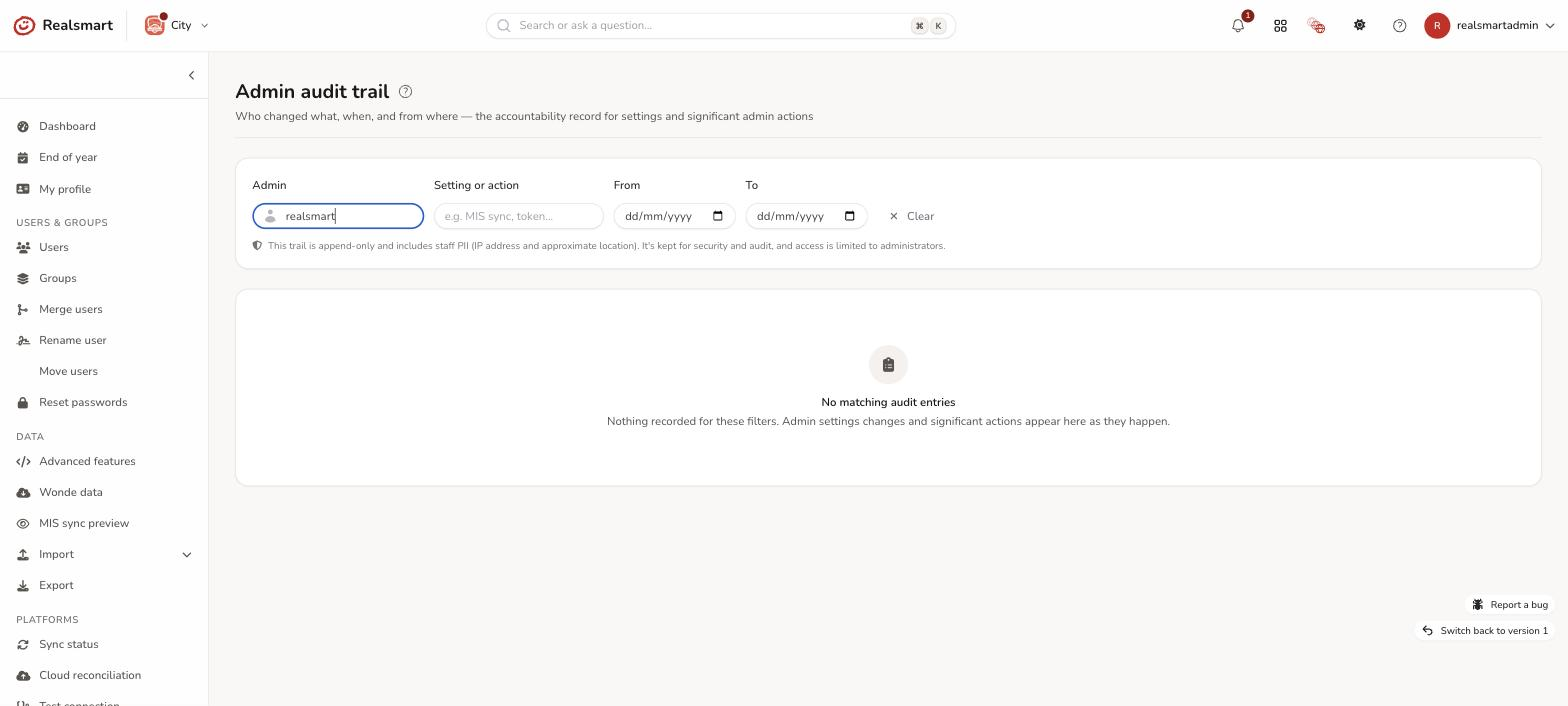
Each row also shows the date and time, and the IP address (with the approximate location when there is one). Select Details on a row for the exact field, the action, the old → new values and the device.
Jumping to the user or group
When an entry is about a specific user or group, expand its Details and use the Open user / Open group button to go straight to that record. If you administer more than one school, it switches you into the entity's school first, so the edit page loads correctly — you never land on a permission error. If the user or group has since been deleted, or is outside the schools you can reach, you'll see a short message instead (That user is no longer available.). The button only appears for admins who hold Manage users & groups; everyone else still sees the entry, just with the plain label (User #123) and no shortcut.
Related
- Recent activity — the human-readable feed of what's been happening to accounts.
- Sync status and logs — the technical event log.
- Reduced admin access — who can see this page.
Was this guide helpful?
We read every response — it decides what we rewrite next.
Thanks for your feedback.