API — connect systems to your school's MIS data
The API area (sidebar → Data → API) exposes your school's MIS data through a read-only API that speaks the same language as Wonde, so systems already built for Wonde can connect to it by changing just the address and the token. This is sometimes called the SOS API internally, because it's backed by SOS-sourced MIS data.
This is a different, separate feature from the Realsmart-native API in the Advanced data area, which only Realsmart's own staff can see. If a developer mentions a "Realsmart API" token, it isn't this one — the two use different tokens and different base URLs and are not interchangeable.
You need the Change sync, platform & API settings permission to see the API item and to create or revoke tokens.
Why you might not see "API" in your sidebar
API only appears once your school is registered for the SOS API and you have the Change sync, platform & API settings permission. If your school's MIS integration hasn't been set up for it, the nav item simply doesn't show — this isn't a permissions problem you can fix yourself. If you believe your school should have it and it's missing, contact Realsmart support. (In MAT overview the API item appears under Data when at least one school you administer is registered.)
If you reach the page for a school that isn't registered, it says This school isn't registered as an SOS school, so the Wonde-compatible API doesn't serve it. The documentation is still shown.
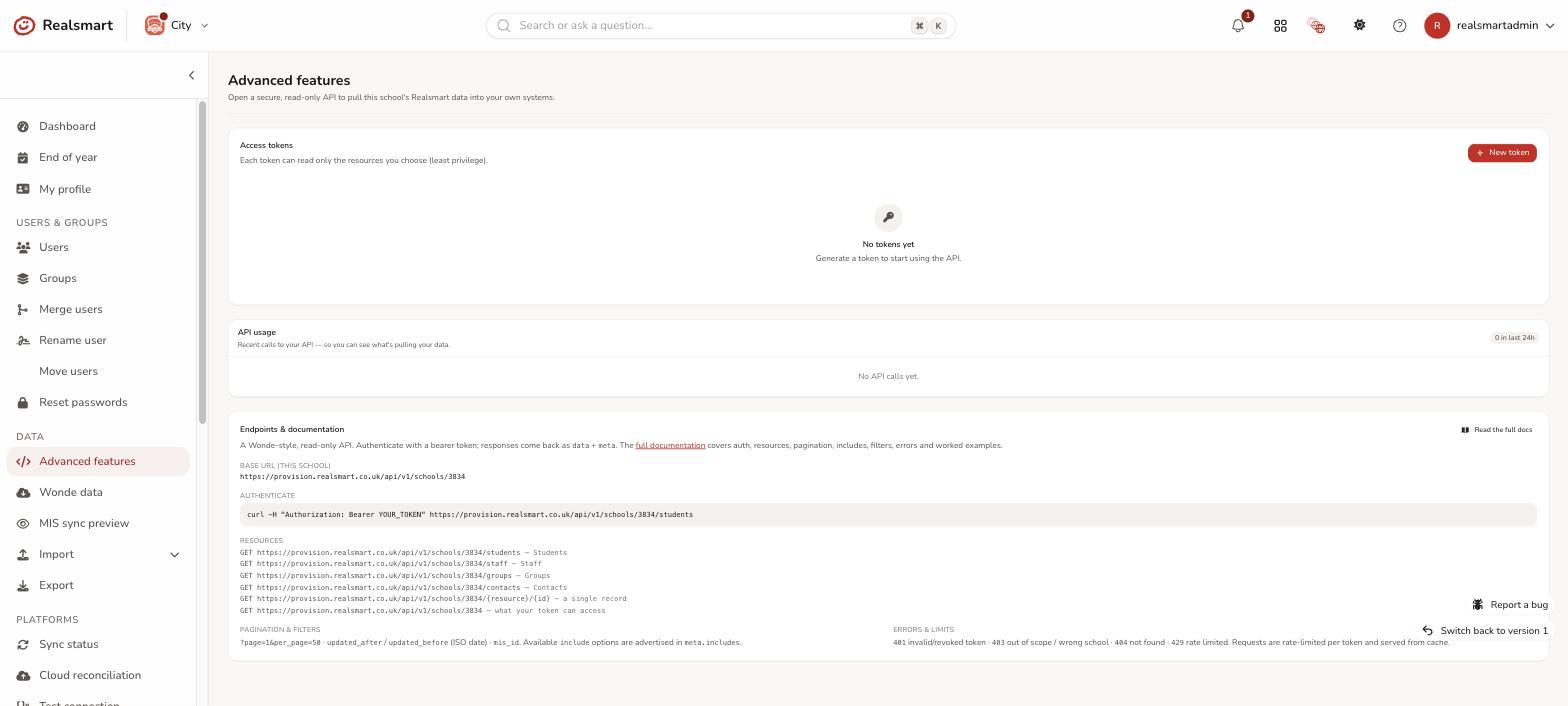
Base URL & authentication
Every request is scoped to your school and versioned. Your school's base URL follows this pattern:
https://<your-adadmin-domain>/v1.0/schools/{school_id}/{resource}
{school_id} is a Wonde-style id (e.g. A0000003929) — your exact id and ready-to-copy URLs are shown on the Tokens and Documentation tabs once you're on the page.
Two equivalent ways to authenticate, matching Wonde exactly:
- Bearer token (most common):
curl -H "Authorization: Bearer YOUR_TOKEN" "https://<your-adadmin-domain>/v1.0/schools/{school_id}/students" - HTTP Basic — the token as the username, empty password (what the official Wonde PHP client sends):
curl -u "YOUR_TOKEN:" "https://<your-adadmin-domain>/v1.0/schools/{school_id}/students"
Use a placeholder like YOUR_TOKEN in anything you share — never paste a real token into docs, tickets, or source control.
Example request & response
A request for students, with a couple of results:
curl -H "Authorization: Bearer YOUR_TOKEN" "https://<your-adadmin-domain>/v1.0/schools/A0000003929/students?per_page=2"
{
  "data": [
    { "id": "10231", "mis_id": "A0421", "forename": "Ada", "surname": "Lovelace",
      "gender": "F", "date_of_birth": { "date": "2012-03-14 00:00:00.000000", "timezone_type": 3, "timezone": "UTC" },
      "upi": "A042112030001" },
    { "id": "10232", "mis_id": "A0422", "forename": "Alan", "surname": "Turing",
      "gender": "M", "date_of_birth": { "date": "2011-11-02 00:00:00.000000", "timezone_type": 3, "timezone": "UTC" },
      "upi": "A042211110002" }
  ],
  "meta": {
    "includes": ["contacts", "classes", "groups"],
    "pagination": {
      "next": "https://<your-adadmin-domain>/v1.0/schools/A0000003929/students?per_page=2&page=2",
      "previous": null,
      "more": true,
      "per_page": "2",
      "current_page": 1
    }
  }
}
(Example data is representative — not real pupils.) Dates are serialised the same way Wonde emits them (the date/timezone_type/timezone object above), and meta.pagination is omitted entirely when a result fits on one page. Add ?include=contacts,classes to pull related objects inline — the includes actually available for each resource are always listed in meta.includes and on the Documentation tab, so read them rather than hard-coding.
Documentation tab
The Documentation tab explains authentication, the response format, pagination, includes and delta filtering (updated_after/updated_before) and errors — generated from the implemented endpoints, so it always matches reality and always shows your school's real base URL. Use Download docs (.md) to take the whole reference (or a single page) as Markdown for other tools.
The same documentation is also served by the API itself, to any active token — so a developer or a coding assistant can pull it without an admin sign-in. See fetching the documentation with a token.
Endpoints tab
The Endpoints tab lists every resource the API serves — students, employees (staff), contacts (parents/guardians), classes, groups, subjects, attendance summaries, session attendance, employee absences, exclusions, behaviours, achievements, events, deletions, and the timetable (lessons, periods and rooms, behind the sos:timetable scope) — each with its scope, query parameters, available includes and a ready-to-run curl example using your school's real URL. Resources SOS doesn't hold (like photos and student pre-admissions) are marked empty for SOS and return valid, correctly-shaped empty responses rather than errors — so a consumer built for the full Wonde API doesn't break.
Tokens tab
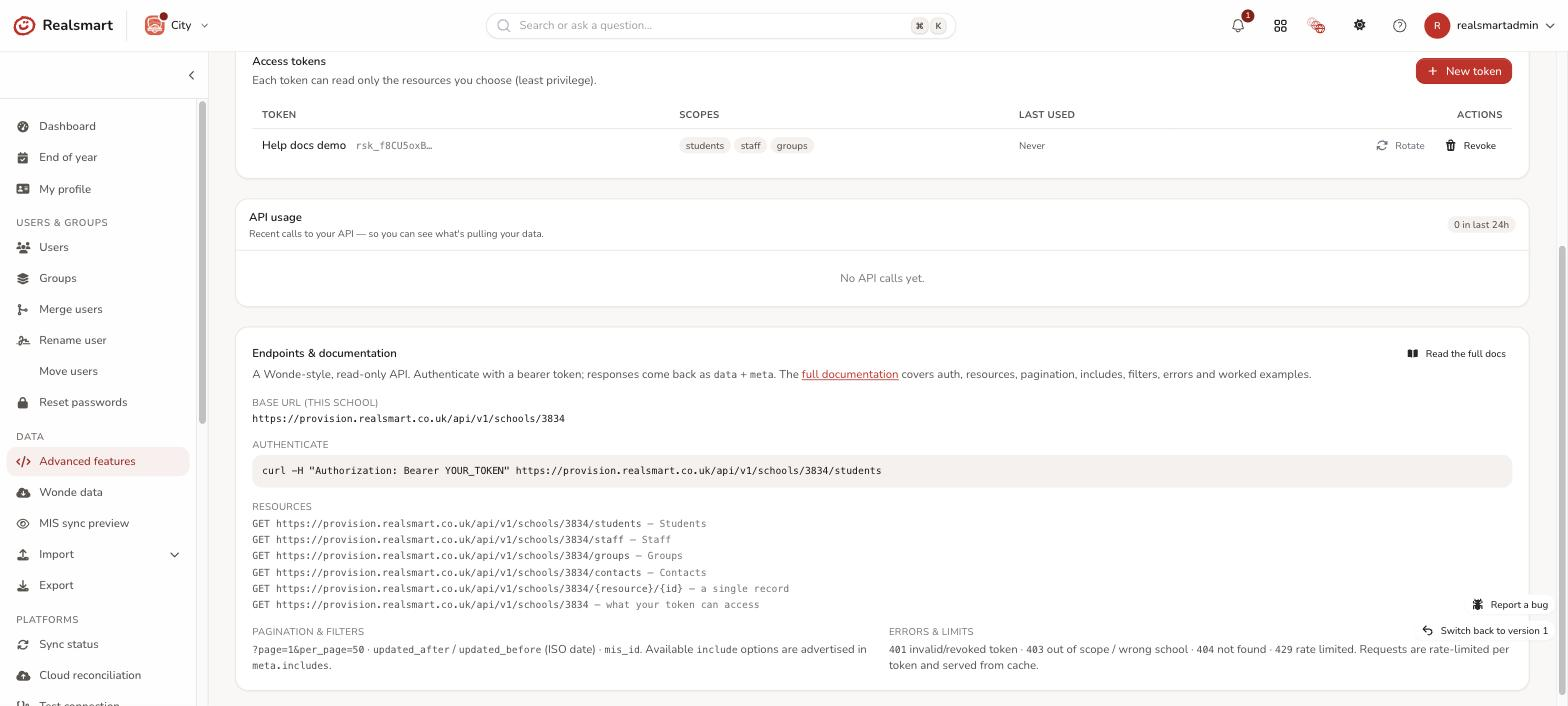
The Tokens tab issues access. Each token:
- reads only the schools it was granted — this school here, or a ticked set of schools when created from the trust's MAT area (consumers see exactly that set from
GET /schools); - reads only the scopes you tick (least privilege);
- is shown once at creation — copy it then; only a hashed copy is stored;
- can have its scopes edited at any time — Edit scopes changes what a live token may read while leaving its secret alone, so you can grant a newly-added scope without reissuing credentials to whoever is using it;
- can be revoked (takes effect immediately, on the very next request) or rotated (revoke + reissue with the same name and scopes);
- can be given an expiry when your environment supports it.
Every API call is logged (token, resource, status, IP — never the data), and the tab shows the last 24 hours of activity.
Editing a trust token. Trust tokens carry two things you can change without reissuing: Edit scopes (what it may read) and Edit schools (which schools it may read). Both leave the secret alone, so the consumer keeps working. Adding a scope that gates sensitive data asks you to acknowledge it first, exactly as creating a token does — you're only asked about scopes the edit actually adds, not ones the token already holds.
Changing which schools a token covers. In the trust's MAT area (MAT overview → API), Edit schools on a token opens the same tick-list used when it was created, and saving changes the school set in place — the secret is untouched, so whatever is using the token keeps working. Use this to widen a token onto more schools without reissuing credentials. Schools you untick lose access immediately, so the page names them and asks you to confirm before saving. You can only tick schools you administer, and you can only edit a token whose current schools are all ones you administer.
Schools and scopes are separate. A token carries one scope list that applies to every school it covers — you never grant a scope for one school and not another. If a token isn't returning data for a school, it's the school set that needs widening, not the scopes.
Tokens shared with other schools. A trust-level token issued from the MAT area can cover several schools at once, and it appears on each of their API pages marked Shared with N schools. You can only edit, rotate or revoke one of these if every school it covers is a school you administer — otherwise the row says so instead of offering the buttons, because revoking it here would cut off the other schools too. When you can act on a shared token, the confirmation tells you how many schools are affected, and rotating one keeps its full school list.
Sensitive data has its own scopes
Some data needs a scope of its own, ticked separately when you create a token (or added later with Edit scopes). Three student includes carry safeguarding and special-category data, and one staff field is a national identifier:
| Where | Scope | Contents |
|---|---|---|
Student include extended_details |
sos:students.extended |
Ethnicity, religion, language, FSM, pupil premium, enrolment, in-care and child-protection indicators |
Student include sen_needs |
sos:students.sen |
Individual SEN needs (type, description, rank) |
Student include medical_conditions |
sos:students.medical |
Medical details (plain text) |
Staff field employment_details.ni_number |
sos:employees.sensitive |
National insurance number |
A token without the scope simply never sees that data — requests still succeed. For the student includes, the include is silently absent and not advertised in meta.includes. For the staff NI number, employment_details still comes back in full, just without that one field — so a system that doesn't need it isn't broken by not having it, and an absent field never gets mistaken for "this member of staff has no NI number".
Every time this data is served, an entry is written to the school's audit trail recording which token accessed it, when, and for how many people — so grant these scopes only to systems that genuinely need them.
Teacher number is not gated. A teacher's DfE teacher reference number comes back in employment_details as teacher_number for any token with plain sos:employees — it's a professional registration number, in the same class as a staff code, not personal data needing its own grant. Both values are exactly what the MIS holds; where a school hasn't recorded one, the API returns null rather than an empty string.
Treat tokens like passwords
Anyone holding a token can read the scoped data. If a token may have leaked, revoke it — anything using it stops working instantly, on its very next request.
Fetch the documentation with a token
Whoever builds the integration doesn't need an ADAdmin login: the documentation is served by the API, to the same token as the data. Give them the token and the base URL and they have everything.
# The whole reference as one Markdown file
curl -H "Authorization: Bearer YOUR_TOKEN" "https://<your-adadmin-domain>/v1.0/docs.md"

# A JSON list of every document, with an absolute url for each
curl -H "Authorization: Bearer YOUR_TOKEN" "https://<your-adadmin-domain>/v1.0/docs"

# One document on its own
curl -H "Authorization: Bearer YOUR_TOKEN" "https://<your-adadmin-domain>/v1.0/docs/endpoints.md"
The Markdown is generated at request time from the endpoints actually deployed, so it can never describe an API that isn't there. It contains documentation only — no pupil or staff data — so any active token can read it, whatever scopes it holds; a revoked or expired token can't. Add ?download=1 to save a file rather than read it inline. HTTP Basic (curl -u "YOUR_TOKEN:") works here too.
This is what to hand a developer, or paste into a coding assistant, so it can write a correct integration from the current contract rather than from memory.
Usernames and email addresses
Students and employees come back with a username and an email alongside their MIS details, and the same address appears in the contact_details include as email and primary.
These two fields don't come from your MIS. SOS holds no email address for pupils at all, and the address it holds for a staff member is their SOS login rather than the account they use day to day. So the API answers with the person's Realsmart account instead: the username they sign in with, and that username at your school's email domain — the same address you see on their user record in ADAdmin. That way a system reading this API and a person reading the Users page see one answer, not two.
Nothing your MIS does hold is thrown away. A pupil's MIS-recorded address is still returned, as contact_details.emails.home, and a staff member's SOS login as contact_details.emails.work.
Both fields come back empty when there's nothing to say — usually a pupil or staff member your MIS knows about who hasn't been provisioned onto the platform yet, or a school with no email domain set. The API never guesses an address.
Was this guide helpful?
We read every response — it decides what we rewrite next.
Thanks for your feedback.