Shared Google domain trusts (trust-level authority)
Some trusts run one Google domain for every school — so [email protected] is a single Google account, even though Sam is a separate record in School A, School B and School C.
The problem this solves
Sync runs per school. Each school compares Sam's real Google groups against its own groups and treats anything it doesn't recognise as stale:
- School A removes the groups that belong to Schools B and C.
- School B then removes A's and C's, and re-adds its own — and so on.
Each school is "correct" from its own view, but they're fighting over one shared account: Sam's groups (and Classroom memberships) are torn down and rebuilt every sync cycle.
What trust-level authority does
Turn on Shared Google domain (trust authority) on the Sync settings page in MAT overview (the page is titled MAT sync settings) and removal becomes a trust-wide decision:
- Adding stays per school — each school still contributes its own memberships.
- Removing requires trust-wide agreement — a group or Classroom membership is only removed when no school in the trust owns it (no live record of that person is in a matching, synced group at any school on the shared domain).
- Genuinely stale memberships are still cleaned up — if no school owns a membership any more, it is removed as normal. The trust check doesn't stop cleanup; it stops schools removing each other's memberships.
The result is a stable end state: the person keeps the union of all their schools' memberships, and only trust-wide orphans are removed.
How to turn it on
- Switch to MAT overview (All schools) in the school switcher at the top of the page, then open Platforms → Sync settings. You need the Change sync, platform & API settings permission.
- If two or more of your schools use the same Google domain, a "Shared Google domain detected" notice shows which domain and how many schools ("N schools share {domain} — each person there is one Google account…").
- Tick those schools in the Schools list, set Shared Google domain (trust authority) to Enable, and select Apply to selected (confirm the dialog). Schools with it on show a Trust authority badge in the Current column. To switch it off again, choose Disable the same way.
See Apply sync settings across the trust for the rest of that page.
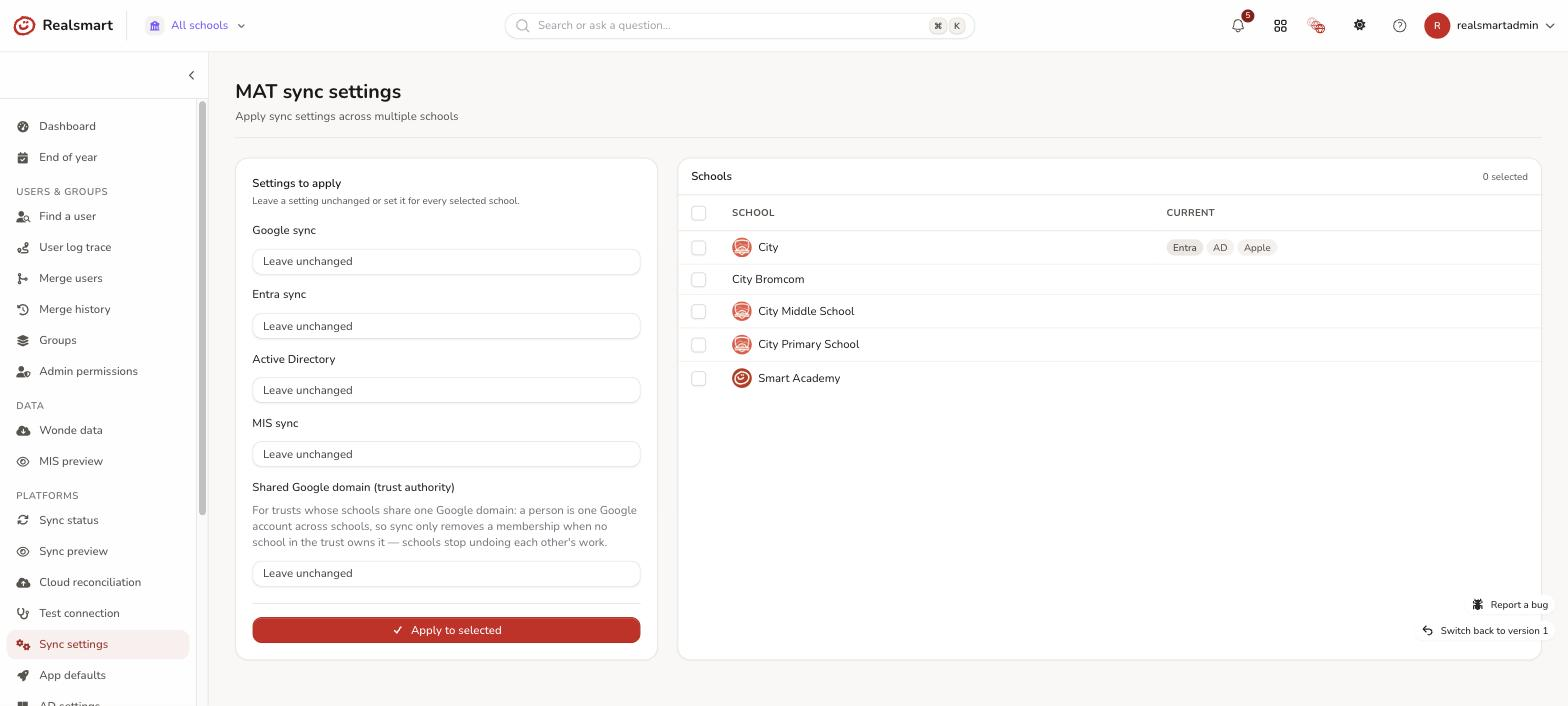
Enable it for all the schools on the shared domain. A school without it can still remove the other schools' memberships.
Normal schools and trusts with separate domains per school are unaffected by this setting.
The account itself is protected too
Trust authority is about memberships. Separately — and with no setting to turn on — the sync will
not let one school perform a destructive change to the account while another school still has
that person as an active user. Renaming the address, suspending, the leaver purge that renames an
account to …_purged_by_realsmart@ and strips its aliases, and outright deletion all check first
whether a sibling school on the shared domain still uses the account. If one does, the action is
skipped and recorded rather than carried out.
This matters most at the end of the year: a person who leaves School A but still teaches at School B has one Google account, and A's leaver processing must not close it. If the check can't establish who owns the account, the destructive action is refused rather than attempted — the safe direction for something that can't be undone.
This protection is for Google only. There is no trust-authority setting for Microsoft Entra, and the Entra sync does not check whether another school still uses a shared Entra account before it disables the account of someone who has been suspended or deleted at one school. If several of your schools share one Microsoft 365 tenant and a person is leaving one school but staying at another, contact Realsmart support before that school's leavers are processed.
How to see it working
- Open User log trace (Users & Groups) for a shared user: a banner confirms one Google account across N schools and whether trust authority is protecting it.
- Protected removals appear in the timeline and Logs as "Retained — {username} kept in {group}: owned by {school} (shared Google domain — trust-level authority)" — set the Outcome filter to All to include them.
- The thrashing stops: you'll no longer see the same memberships removed and re-added every cycle.
Related
Was this guide helpful?
We read every response — it decides what we rewrite next.
Thanks for your feedback.