Google Calendar timetable sync
Calendar sync gives each person a "rs - … Timetable" calendar in Google, filled with their timetabled lessons from the MIS and kept in sync overnight (every day except Saturday). Only lessons that changed are touched — a quiet timetable costs nothing and nobody's calendar flickers. Calendars normally show the next 13 weeks of lessons.
Before you start
- You need to be an admin with sync settings permission, with the school picked in the switcher.
- Calendar sync is a Google feature: it only runs while Google sync is on and live for the school (School settings → Sync services — in preview nothing is written to Google). See Google Workspace settings.
- The lessons come from your timetable in your MIS, through Wonde. The Timetable data card at the top of the settings page shows what Realsmart has received (see What we hold).
- Room booking also needs the
admin.directory.resource.calendaraccess to be authorised in Google Admin — see Google Workspace settings.
Turn it on
In the sidebar open Google Workspace → Calendar sync (or Calendar settings in MAT overview, where Apply across MAT copies settings to other schools — see Apply sync settings across the trust). The Google Workspace group only shows in the sidebar while Google sync is on. The page is titled Calendar sync settings and has one section, Timetable calendars, with three switches and two options:
- Staff timetable calendars — each member of staff gets their lessons.
- Learner timetable calendars — each learner gets theirs.
- Room booking (resource calendars) — lessons also book the room as a Google resource, so room calendars show real availability.
- Which classes appear for staff — every class they teach (Every class they teach), or only classes where they are the main teacher (Only classes where they are the main teacher).
- Include co-taught lessons — staff also get lessons your MIS lists them on alongside the main teacher. See Co-taught lessons.
Select Save settings. If the save turns a calendar switch off, a Confirm these changes window shows what will be deleted first (see Turning calendar sync off); otherwise you'll see "Calendar sync settings saved." The change applies on the next overnight run.
Turning a switch off deletes the calendars it created — see Turning calendar sync off before you do.
Co-taught lessons
By default a member of staff gets the lessons your MIS names them as the teacher on. When two people share a lesson, the MIS usually names only one of them, so the other is missing it.
Include co-taught lessons adds every lesson your MIS lists them on as well — but only those lessons, not the rest of that class's timetable.
Check your MIS before you turn it on. Some MIS record shared lessons one by one, which is what this needs. Others list a head of department, a senior leader or a teaching assistant on every lesson they oversee, and turning it on would fill their calendars with overlapping lessons. If you are not sure, ask support to check your data first.
It is off unless you turn it on, and it has no effect while Which classes appear for staff is on "main teacher only". Changes apply on the next nightly sync — turning it off takes the shared lessons back off staff calendars the same night.
What we hold: the Timetable data card
Above the switches, the Timetable data card answers "why is the calendar empty?" before you ask support. It shows what Realsmart has received from your timetable system:
- Last received, Lessons held (with the dates they cover) and Calendars up to date — for example 412 of 430. Still updating calendars means the rest haven't yet been rewritten with the latest timetable; they are worked through in the background and finish without anyone doing anything.
- Calendars show up to … — calendars are filled a few weeks ahead at first and widen a little each night, rather than writing a whole year at once. Lessons after that date are held and appear as the window grows — nothing is missing.
- Staff coverage — how many people have upcoming lessons, and the names of staff who have none in the data (so their calendar will be empty). If any of them should have a timetable, check it in your timetable system — Realsmart can only put on a calendar what it is sent.
- When we received it — lessons received each day over the last fortnight. A small number on one day means that is all your timetable system had for Realsmart then.
- No timetable data received — a warning instead of all this: no lessons have arrived, so calendars will be empty. Usually the timetable hasn't been published in your timetable system yet, or it isn't shared with Realsmart. Publish it and the calendars fill on the next overnight run.
The card ends with a reminder worth passing on: timetables are written to a separate calendar in Google, not to the person's own default calendar. If someone sees their meetings but no lessons, check the timetable calendar is ticked in their calendar list in Google Calendar.
Turning calendar sync off
Switching a calendar off is a delete instruction, not just a setting: Realsmart removes the calendars that switch created from Google, along with everything on them. Saving the change shows you what will go — including how many people currently have a calendar — and asks you to confirm.
It cannot be undone. Turning calendar sync back on later builds new calendars from the current timetable. It does not restore a deleted calendar, its history, or anything anyone added to one by hand.
What each switch takes with it:
- Staff timetable calendars off — staff calendars go, learners' stay.
- Learner timetable calendars off — learners' go, staff's stay.
- All three off — the school leaves calendar sync and every timetable calendar is removed.
- Room booking off — lessons stop booking rooms and Realsmart's events are cleared off the room calendars. The room resources themselves are left alone.
It happens over several nights
Removal starts on the next nightly sync and works through a batch at a time — about 100 calendars per school per night — so a large school takes a few nights to clear. That is deliberate — deleting a whole trust's calendars in one night would swamp the sync queue, and draining it gradually keeps the operation reviewable while it runs.
While it is working, the Calendar sync settings page shows a Removing calendars banner with how many calendars are left ("N timetable calendars are still to be deleted from Google. A batch goes on each nightly sync…"). If you change your mind, turn a switch back on: removal stops immediately and the calendars that survived are rebuilt on the next sync. Removal carries on even if Google sync has since been switched off.
If a calendar will not delete
A calendar belonging to someone whose Google account has been deleted or purged sometimes cannot be removed. Realsmart retries for several nights (10 failed attempts), then stops and reports it rather than failing every night for ever. The banner on the settings page names how many are in that state ("N calendars could not be deleted after repeated attempts and are no longer being retried. They are still live in Google — contact support.") — those need us to look at them, so contact support.
Debug a user's calendar
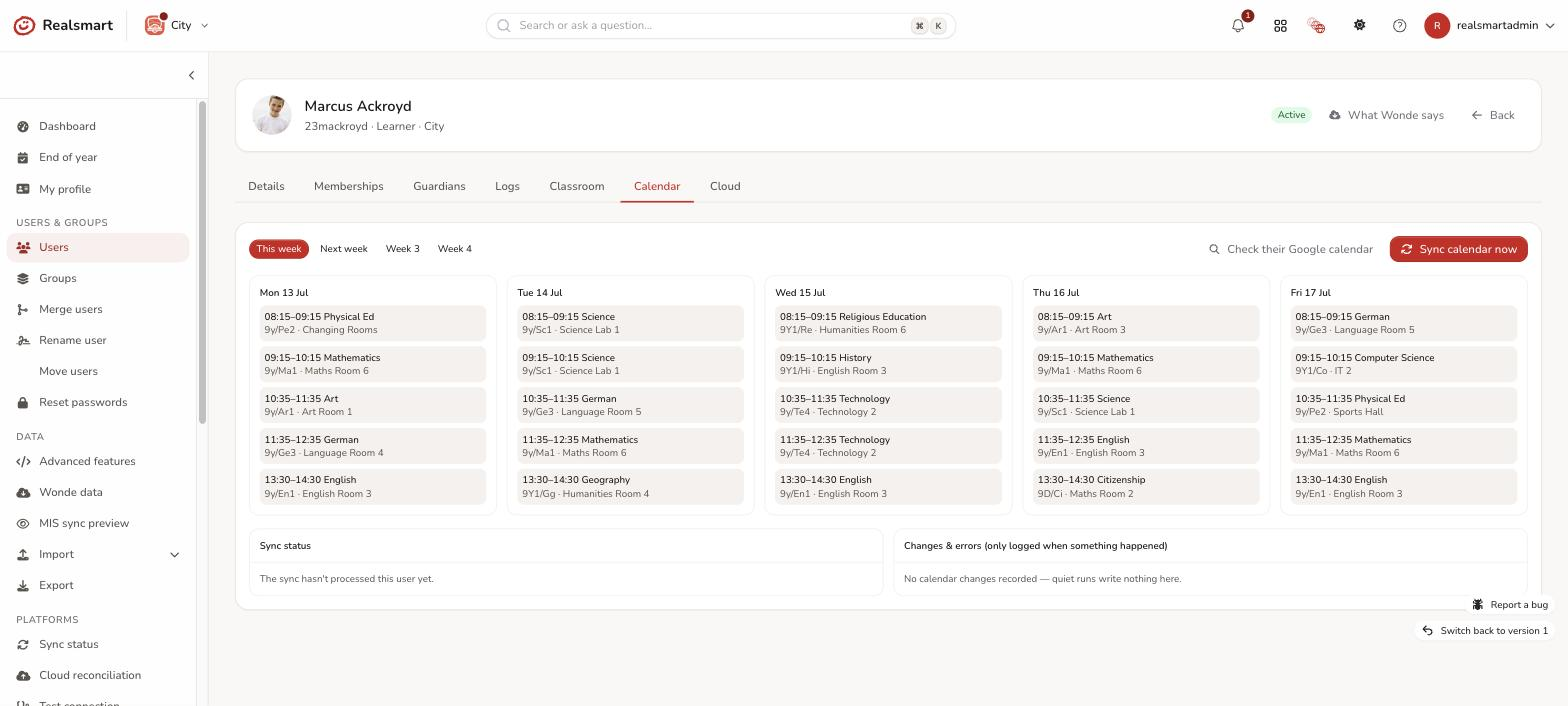
Open the user (Users → the person) — when calendar sync is on, they have a Calendar tab (you need to be an admin who can manage users) showing three things:
- What should be there — their timetabled lessons, one column per day. This week, Next week, Week 3 and Week 4 switch the week.
- What the sync did — Sync status (a badge such as COMPLETE or ERROR, with notes) and Changes & errors, a change log with real error detail. Quiet runs write nothing; if something failed you'll see why, not "unknown error".
- What Google actually has — select Check their Google calendar for a live read of the next 7 days ("In their Google calendar right now (next 7 days · N events)"). A green dot marks events the sync manages.
If it looks wrong, Sync calendar now (confirm "Queue a full calendar re-sync for this user now?") queues a full re-sync of just that person through the normal machinery — you'll see "Calendar re-sync queued for this user — allow a few minutes, then re-check." Allow a few minutes, then re-check.
Troubleshooting
- "No timetabled lessons for this user in this week — nothing for the sync to put in their calendar" — the MIS import hasn't brought lessons in for their classes yet, or they're not attached to any timetabled class. Check Staff coverage on the settings page.
- "No timetable calendar is registered for this user yet — the sync creates one on its first run" — the sync hasn't run for them since being enabled; use Sync calendar now or wait for the overnight run.
- "Could not read their Google calendar: …" — Google refused the live check; the reason follows. Check Google sync is live and the Calendar access is authorised (Google Workspace settings).
- Calendars aren't being created at all — Google sync must be on and live: in preview, or with Google off, calendar sync does nothing (except removing calendars you've switched off).
- Staff see their meetings but no lessons — the timetable lives on a separate calendar; tick it in their Google Calendar list.
- Two "rs - … Timetable" calendars, and one is empty — the empty one is an old copy left over from Realsmart's previous calendar system, which stopped updating in July 2026. The one with upcoming lessons is the live one. In Google Calendar, untick or hide the empty one (it doesn't affect the live calendar), then contact support and we'll remove the old copy for you.
- Lessons wrong for a teacher — check Which classes appear for staff: on "main teacher only", classes where they aren't the main teacher won't appear.
- A teacher is missing a lesson they share with a colleague — the MIS names the colleague on it. Turn on Include co-taught lessons (read Co-taught lessons first).
- Staff calendars full of overlapping lessons — your MIS lists them on lessons they oversee rather than teach. Turn Include co-taught lessons off.
- Calendars still in Google after switching off — removal runs over several nights. The settings page shows how many are left; if the number isn't falling, contact support.
- Switched off long ago and the calendars are still there — schools that switched off before September 2026 were never removed, because the sync simply stopped visiting them. Contact support and we'll clear them.
Was this guide helpful?
We read every response — it decides what we rewrite next.
Thanks for your feedback.